Share 360 Spins on Social Media as GIF or Video
 By Olha Kersting, Head of MarketingUpdated
Short answer
Social networks don't run the interactive Sirv viewer inside posts, so share a spin as an animated GIF or an MP4 video. Add ?image to the spin URL or click Download as GIF for a GIF, or click Convert to video for an MP4. Video is smaller and plays more reliably in feeds.
After reading this you will know
- Whether to share a spin as a GIF or a video
- How to make a GIF or video from any spin
- How to post it on Facebook, LinkedIn, X, Pinterest and Instagram
Share spins on social media
Section titled “Share spins on social media”The 360 degree spins you create on Sirv can be shared in social media posts and articles as an animated GIF or video.
Social platforms don’t run the Sirv viewer inside posts, so export a GIF or MP4 from your spin. This guide covers Facebook, LinkedIn, X (Twitter), Pinterest and Instagram.
Should I share a GIF or a video?
Section titled “Should I share a GIF or a video?”| Use case | Best output | Why |
|---|---|---|
| Short loop, simple motion | GIF | Easy to preview and paste into some article editors |
| Product rotation in a feed | MP4 video | Smaller file size and more reliable autoplay |
| High-resolution spin | MP4 video | Better compression and colour quality |
| LinkedIn article | GIF or MP4 | Test the exact article or post type before publishing |
| Instagram post or Reel | MP4 video | Instagram shows animation as video |
Keep the interactive .spin on Sirv for your website, and publish a GIF or MP4 version to social networks.
Generate a GIF for social media
Section titled “Generate a GIF for social media”To display your spin as a GIF, you can either click the “Download as GIF” button in your Sirv account or simply add ?image at the end of your spin URL. For example:
https://demo.sirv.com/ring/ring.spin?image
Generate a video for social media
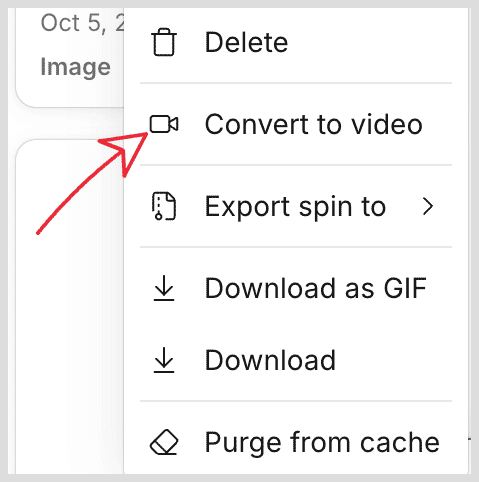
Section titled “Generate a video for social media”If your spin is very detailed, a video may be more suitable than a GIF. Videos are better compressed and support more colors. On a Business 5 plan or higher, click … on your spin (or right-click it) and choose Convert to video:
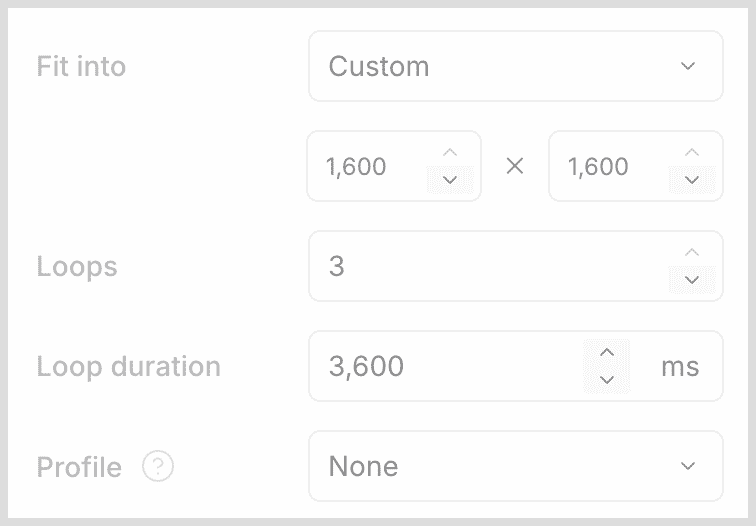
Then choose the height or width of your video, plus the number of times it should loop:
Download your video, then you can upload it to social media sites.

There are two ways to share GIFs on Facebook. Either paste the URL of the spin into a Facebook post and it’ll be displayed as a GIF, hosted on Sirv.
Or download a video or GIF from your Sirv account and upload it to a Facebook post. Short videos will automatically loop on Facebook.
For detailed instructions, read our guide to sharing 360 spins on Facebook.

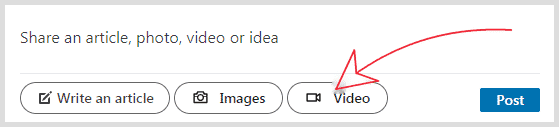
LinkedIn posts support videos and LinkedIn articles support GIFs. To share a video in a post to your LinkedIn feed, click the “Video” button to upload it:
If you’re writing a LinkedIn article, paste the URL of your GIF and it will animate in the article.
Or you can upload the GIF as a header image and it will animate both inside the article and in the article preview in your followers feeds.
Follow the complete guide to posting GIFs on LinkedIn.
 To post a GIF or a video on X, click the

icon to upload an image or video. Select the file from your computer and a thumbnail will appear:
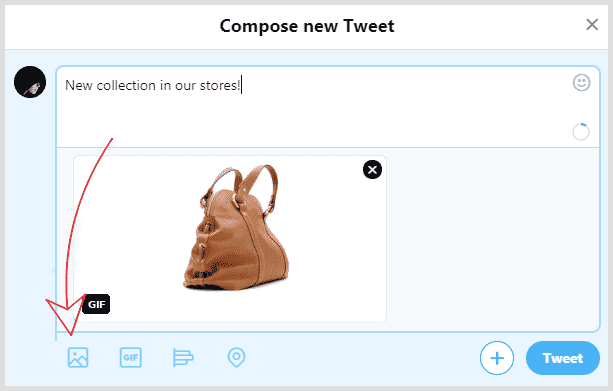
GIFs and videos play and loop automatically on X. Upload MP4 video for longer or smoother product spins.
 Share a spin on Pinterest by uploading it. Go to your “Pins”, click the

icon and drag-and-drop the GIF from your computer. A preview will appear:
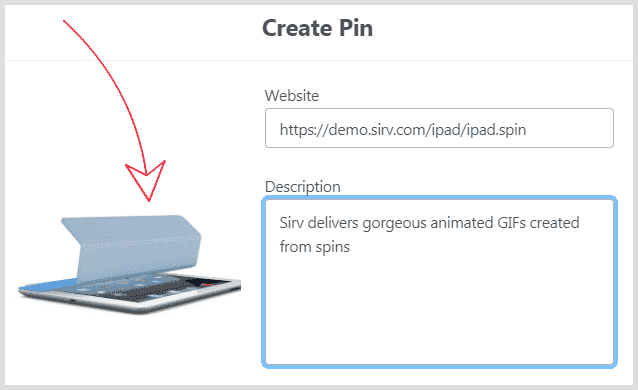
You can add a URL, such as the full-size interactive spin on Sirv. Alternatively, you can click “Save from site” and paste the URL of your spin on Sirv:
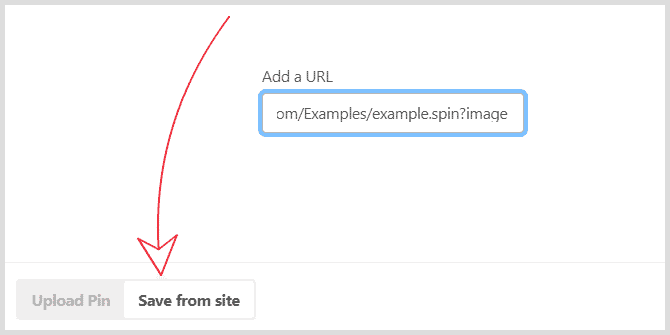
Afterwards, you can edit the description and add it to your boards. If you advertise on Pinterest, you can also upload videos to Pinterest.
 Post your spins to Instagram by uploading them as a video. Download a video from Sirv, copy it to your smartphone, then open the Instagram app. Click the

icon and then the “Gallery” at the bottom of your screen. Select the video you wish to post and edit your video as you wish, with filters and a cover.