How to customize the 360 spin loading bar
 By Marc Bonne, Customer Success TeamUpdated
Short answer
A loading bar shows over a 360 spin while its images load. Change the "Loading..." text in the Spin options of a profile, with separate text for the fullscreen view. Change its size, position and colors with CSS on your page, or hide the loading bar completely with a few CSS rules.
After reading this you will know
- How to change the loading text on a 360 spin
- How to restyle or hide the loading bar
The loading bar shows over a spin while it is loading. You can change the design by adding some CSS to your page, as you can for the hint message and the fullscreen buttons.
The standard Sirv Spin loading message looks like this:

Change the loading text
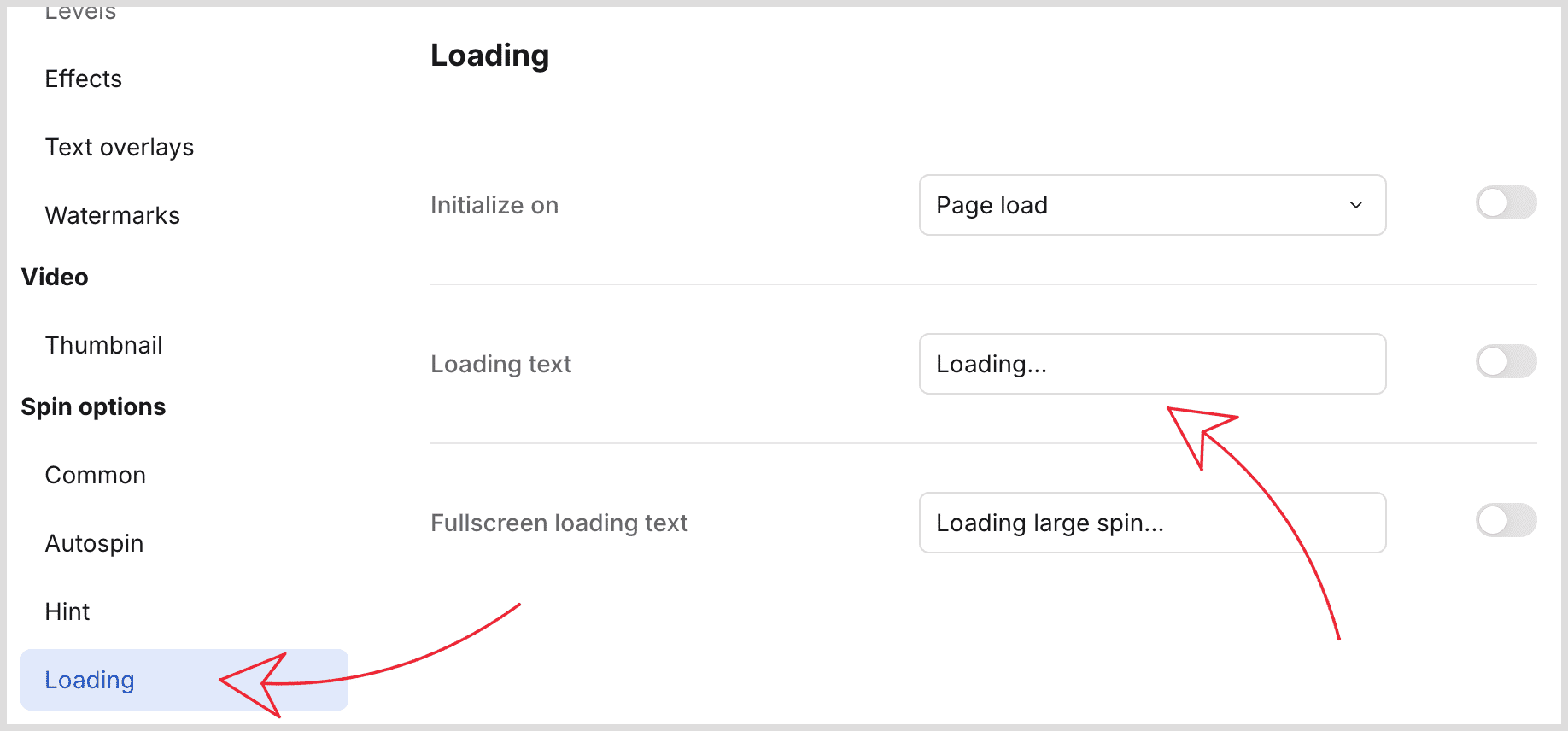
Section titled “Change the loading text”To change the “Loading…” text, open your profile, go to Spin options > Loading and enter the text you’d like to show. The fullscreen view has its own text:
Change the loading design
Section titled “Change the loading design”To change the size, position, color, and design of the hint, add some CSS styles to your HTML page.
Below are all the styles available to be edited. Add padding, margin, font styles and other CSS as you require to create the design you wish:
<style type="text/css"> .sirv-spin-progress-bar-state, .sirv-spin-fullscreen .sirv-spin-progress-bar-state, .spin-figure .sirv-spin-hint { } .sirv-spin-loading-box, .spin-figure .sirv-spin-hint { } .spin-figure .sirv-spin-hint .hint-side, .sirv-spin-hint-side { } .spin-figure .sirv-spin-hint .hint-text { } .sirv-spin-loading-box { } .sirv-spin-progress-text { } .sirv-spin-fullscreen .sirv-spin-progress-text { } .sirv-spin-progress-bar, .sirv-spin-progress-bar-state { } .sirv-spin-fullscreen .sirv-spin-progress-bar, .sirv-spin-fullscreen .sirv-spin-progress-bar-state { } .sirv-spin-progress-bar { } .sirv-spin-fullscreen .sirv-spin-progress-bar { } .sirv-spin-progress-bar-state { } .sirv-spin-fullscreen .sirv-spin-progress-bar-state { }</style>Here’s a spin with a custom loader:
The message was created with this CSS:
<style type="text/css"> .sirv-spin-progress-bar-state, .sirv-spin-fullscreen .sirv-spin-progress-bar-state, .spin-figure .sirv-spin-hint { background-color: rgba(173, 45, 91, 0.75); background-image: none; } .sirv-spin-loading-box, .spin-figure .sirv-spin-hint { font-size: 14px; font-family: 'Helvetica Neue', Helvetica, Arial, sans-serif; padding: 0.3em 0.1em; box-shadow: none; border: none; border-radius: 0px; opacity: 1; width: 100%; max-width: 100%; top: auto; bottom: 0 !important; left: 0; right: 0; -webkit-transform: none !important; transform: none !important; -webkit-font-smoothing: antialiased; } .spin-figure .sirv-spin-hint .hint-side, .sirv-spin-hint-side { display: none; } .spin-figure .sirv-spin-hint .hint-text { width: auto; max-width: 96%; color: #fff; display: inline !important; } .sirv-spin-loading-box { padding: 0; background-color: transparent; } .sirv-spin-progress-text { color: rgba(230, 210, 210, 1); margin-bottom: 3px; text-indent: 3px; } .sirv-spin-fullscreen .sirv-spin-progress-text { font-size: 12px; text-indent: 0; top: -14px; } .sirv-spin-progress-bar, .sirv-spin-fullscreen .sirv-spin-progress-bar { background-color: rgba(230, 210, 210, .2); border: 0; border-radius: 0; margin: 0 auto; } .sirv-spin-fullscreen .sirv-spin-progress-bar { border: 0px solid rgba(173, 45, 91, 0.1); } .sirv-spin-progress-bar-state, .sirv-spin-fullscreen .sirv-spin-progress-bar-state { border-radius: 0; height: 3px; }</style>Hide the loading bar
Section titled “Hide the loading bar”To remove the loading message entirely, apply the following CSS to your HTML page.
<style type="text/css">.sirv-spin-loading-box { display: none;}</style>With that CSS on your page, spins load without showing the loading bar.