Sirv Billing: Plans, Renewals, Payment and Invoicing
 By Anne-Marie Fletcher, Customer Success TeamUpdated
Short answer
New accounts get a free 30-day trial, then move to the Free plan unless you upgrade. Paid plans are billed monthly or yearly, and yearly plans get one month free. Cards are charged in US dollars at 03:00 UTC, and invoices are emailed to Owner and Billing Manager users. Plan changes take effect immediately.
After reading this you will know
- How the free trial, paid plans and sub-accounts are billed
- How and when you are charged, and how to pay by bank transfer
- What happens when a payment fails, and how to upgrade, downgrade or cancel
New accounts start on a free 30-day trial. Upgrade to a paid plan whenever you wish - your new plan will start immediately and any remaining free trial days will end.
If you do not upgrade within 30 days, your account will switch to the Free plan, which shows a small Powered by Sirv link on spins and zooms.
Paid plans
Section titled “Paid plans”Sirv offers a variety of price plans to suit businesses from startups to multinational corporations. Choose your paid Sirv plan from your Sirv account.
Pay either monthly or yearly - annual plans receive a discount equivalent to 1 month free.
High transfer plans
Section titled “High transfer plans”If you require a large amount of bandwidth and only a small amount of storage, a High Transfer plan might be more suitable for you.
You can’t choose these plans in the Sirv app, so contact Sirv support to ask about these plans.
Custom plans
Section titled “Custom plans”We can also tailor a custom plan if you have specific requirements for: number of users, sub-accounts, custom domains, data transfer, storage or API usage.
Please describe your requirements or arrange a call with the Sirv customer success team.
Sub-accounts
Section titled “Sub-accounts”Sirv also offers a shared billing plan which permits you to have many accounts paid by a single regular invoice.
This is a great solution for digital agencies with many clients, organizations with many divisions or companies needing separate accounts for different environments.
Learn more about master and sub-accounts.
Payment and currency
Section titled “Payment and currency”The typical payment method is credit/debit card. Once you have entered your card details and chosen a price plan, your card will be charged at 3am UTC the following day.
Credit/Debit card
Section titled “Credit/Debit card”
All major credit/debit cards are accepted, including Visa, Mastercard, American Express, Discover and Maestro. Credit card payments are billed in US Dollars.
If your card currency is not USD, your bank will convert the USD amount to your local currency.
Bank/Wire transfer
Section titled “Bank/Wire transfer”Alternatively, you may pay by bank transfer for annual billing plans that exceed $500 per year. The currency of your invoice will be determined by your location:
- GBP - if your billing country is the UK
- EUR - if your billing country is in the Eurozone
- USD - if your billing country is elsewhere in the world
Please contact Sirv support if you’d like to switch to yearly bank payments.
Invoices
Section titled “Invoices”Invoices will be emailed to all Owner and Billing Manager users (see Users) at 03:00 UTC, if your card was successfully charged.
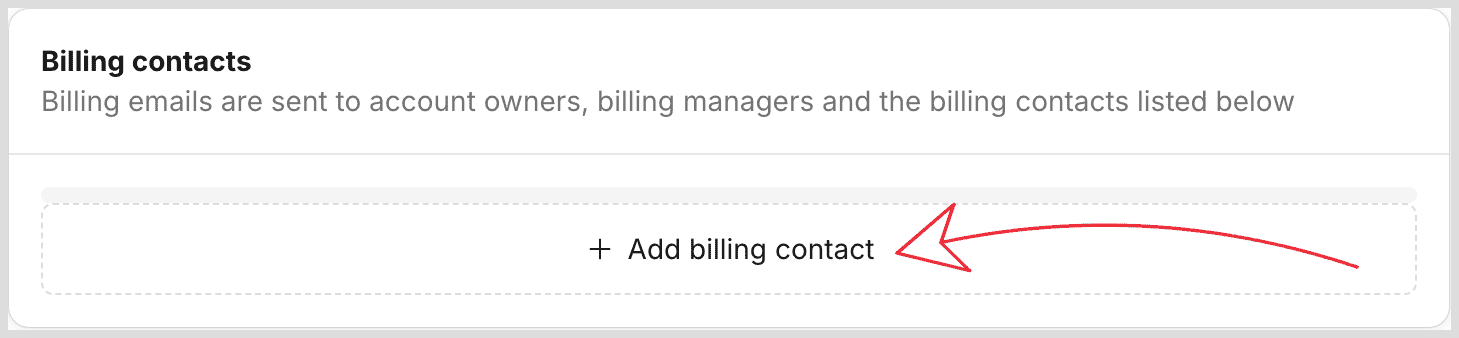
Invoices can also go to other email addresses without adding them as users. Add them under “Billing contacts”, at the bottom of Settings > Billing:
Invoices can also be downloaded from your Invoices page.
Subscription renewal
Section titled “Subscription renewal”Your subscription will automatically renew each month or year. To end your subscription, switch to the Free plan or close your account (see cancellation).
Failed payment
Section titled “Failed payment”If payment fails, the system will retry your card each night at 03:00 UTC until successful payment has been received, then you will receive your invoice by email.
Payment failure notifications will be emailed to all Owner and Billing Manager users after 7, 14 and 28 days of non-payment. If payment fails for 30 days, your account will become frozen.
Updating your card
Section titled “Updating your card”If you enter a new card, the system will attempt to charge it at 03:00 UTC the following morning.
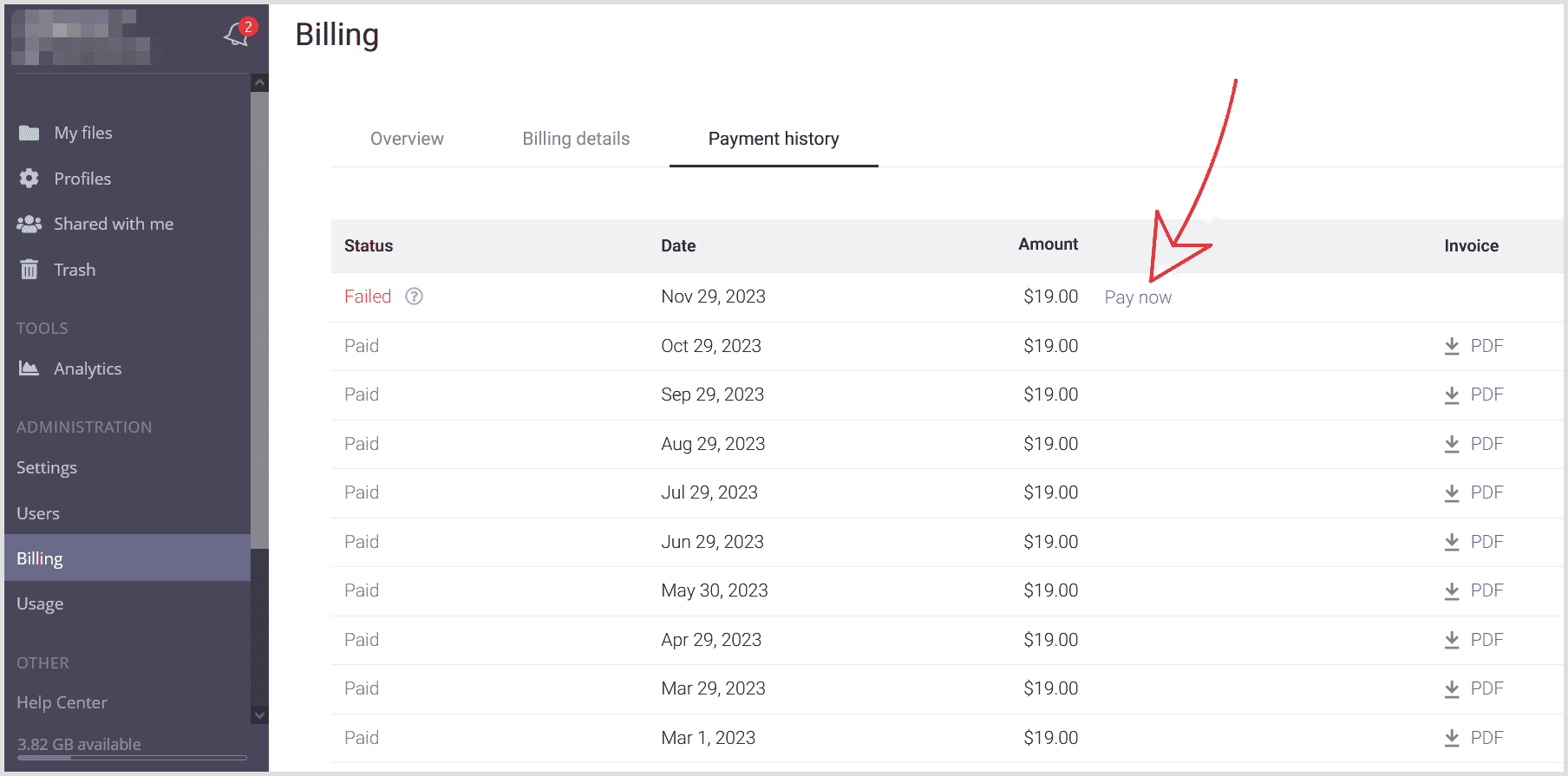
Alternatively, click ‘Pay now’ on your Invoices page to pay immediately. A confirmation email will be sent once your card has been successfully charged.
Upgrade or downgrade
Section titled “Upgrade or downgrade”You can change your plan at any time. Your new plan will start immediately when you upgrade or downgrade.
All remaining days from your old plan will be credited to your new invoice and a new full period (month or year) will commence.
Your card will be charged at 03:00 UTC and an invoice will be sent by email once payment has been received.
Cancellation or downgrade to Free
Section titled “Cancellation or downgrade to Free”To cancel your Sirv subscription, you can either switch to the Free plan or permanently close your account with the red “Close account” button, under Cancellation in Settings > Account.
To switch to the Free plan, delete sufficient files so that your account uses less than 500 MB of storage. Your last 2 months of data transfer should be less than 2 GB per month.
If you cancel a paid plan, you will receive a credit for future Sirv usage, equivalent to the value of all unused days.
Credits do not expire, so you can use the funds towards any future project. Refunds are not provided.
Purchase orders
Section titled “Purchase orders”Invoices are issued without requiring a purchase order (PO).
If your finance team requires a purchase order to be displayed on the invoice, the Enterprise plan permits the creation of custom invoices with PO numbers.
It also permits invoices to be submitted through your invoice management system, if your organization needs it. Please contact the Sirv customer success team with your requirements.