Handling Invalid Image Query Strings
 By Jake Brumby, Customer Success DirectorUpdated
Short answer
By default, Sirv returns a 400 error with a JSON message when an image URL has an option it doesn't recognise, such as ?ww=600. You can tell Sirv to ignore the wrong options and still return the image instead, in your Default profile or any other profile. Errors help you find mistakes; images keep pages looking right.
After reading this you will know
- What happens when an image URL has an invalid option
- How to return the image instead of an error
- Which choice suits your site, and how to fix invalid queries
You can choose how Sirv treats any image URLs with an invalid query string, just as you can choose a custom image for missing files.
If an image is requested with a string that does not match one of Sirv’s 110 dynamic imaging options, you can decide whether to return an error or ignore the invalid string.
Return invalid queries as 400 error
Section titled “Return invalid queries as 400 error”By default, if the query string of an image URL is not entirely valid, Sirv will return a 400 error. The error shows a helpful JSON message, describing why the string was invalid.
For example, the following image URL has a query string of ?ww=600 which is incorrect.
It was probably intended to be ?w=600 which would scale the width to 600px: https://demo.sirv.com/example.jpg?ww=600

The body of the error response will look like this:
{ "name": "ApiDataValidationError", "message": "Supplied data is not valid", "validationErrors": [ { "code": "OBJECT_ADDITIONAL_PROPERTIES", "message": "Additional properties not allowed", "path": "#/", "params": { "properties": [ "ww" ] } } ]}Return invalid queries as image
Section titled “Return invalid queries as image”Instead of returning a 400 error, you can return the image as an image. Sirv will ignore the invalid parameters and apply the valid parameters.
For example, the following image URL string has one valid and one invalid parameter: https://demo-query.sirv.com/example.jpg?ww=600&text.text=Hello

That image belongs to a Sirv account configured to ignore invalid parameters, so the invalid ww parameter is skipped and the valid text.text parameter is applied.
Notice how the image is returned at full size because there are no valid scaling parameters in the URL.
How to return an image
Section titled “How to return an image”To return an image instead of an error, either set that option in your Default profile or a custom profile (to apply it only to images referencing that profile).
1. Go to the Profiles page of your Sirv account.
2. Click the “Edit” button next to the profile you wish to change.
3. In “Delivery settings”, turn on the switch next to “Ignore invalid parameters” and set it to “Enabled”.
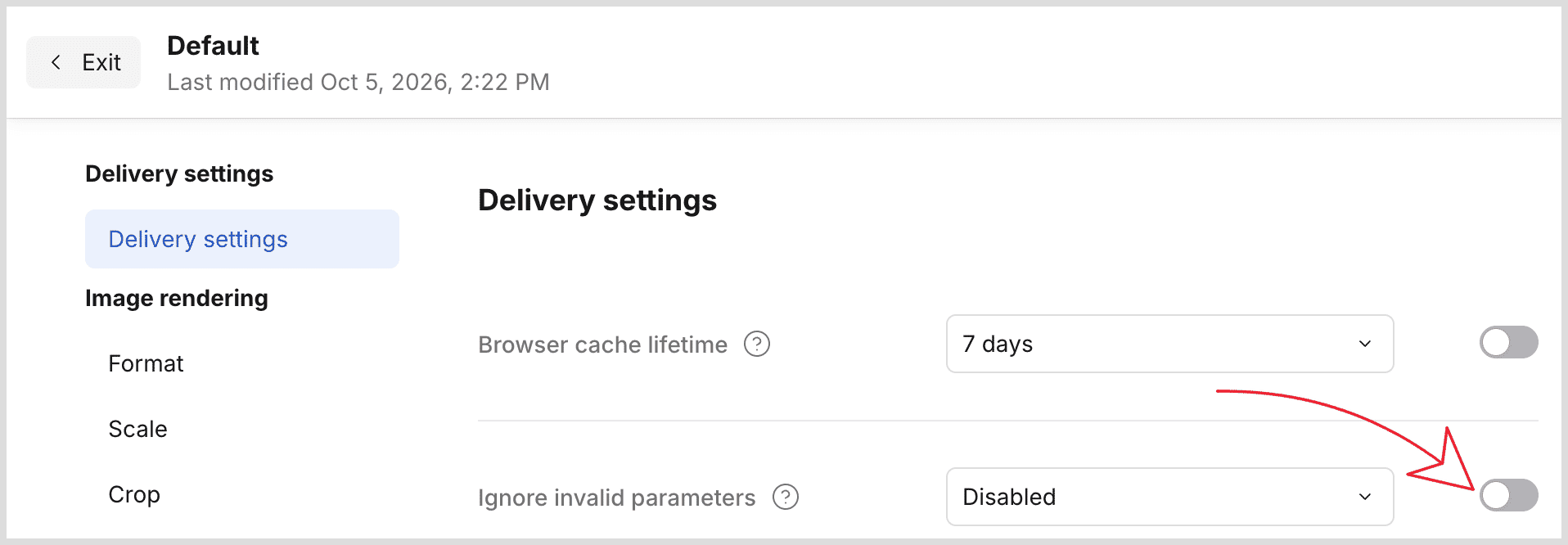
4. Click “Save changes”.
Pros and cons of each method
Section titled “Pros and cons of each method”When deciding which method to use, consider these differences:
| Return an error | Return an image |
|---|---|
| User will not see an image | User will see an image (probably not the intended one) |
| Developer will see cause of error | Developer should investigate cause of error themselves |
| Errors shown in Sirv analytics, so you can fix them | Errors not shown in Sirv analytics, so you won’t know if they exist |
Causes of invalid queries
Section titled “Causes of invalid queries”The common causes of invalid queries are:
-
Bad encoding - backend systems, CMS platforms, scripts, email and other systems might unnecessarily encode characters.
For example, they might incorrectly convert & into & breaking the URL: example.
-
Human error - it’s natural to make mistakes when you’re coding and a developer could mistype the query and cause an error.
Such an error would normally be caught by testing the code before going live.

Fix your invalid query strings
Section titled “Fix your invalid query strings”The best solution is to serve images with valid query strings.
We recommend regularly checking your account’s error 400 analytics - they will reveal the top 50 images that returned a 400 error.
Click each one to see a list of referring URLs showing where each request is coming from (assuming your page/server has a suitable referrer policy).
Once you know where the requests are originating from, you can fix them. If the 400 errors are caused by a bot, you can probably ignore them.
Your files are open to the world to see, so it’s natural that some bots/scripts/spiders might request files/strings that do not exist.
But if you see a lot of 400 requests for a particular image, then you should investigate whether it is coming from a genuine referrer that needs to be fixed.