How to create a 360 spin file
 By Marc Bonne, Customer Success TeamUpdated
Short answer
Upload at least 8 images, up to 1000, whose file names hold a sequence of ascending numbers, and Sirv creates a .spin file for you. One number makes a single-row 360 spin; two numbers, for row and column, make a multi-row 3D spin. A .spin file is a JSON text file that lists the images and settings.
After reading this you will know
- Which file names make Sirv create a spin
- How to name images for single-row and multi-row spins
- What happens when you replace, lose or corrupt an image
You can create 360 spins from 3 different sources:
- Images - the most popular method to create a spin is from a series of photos. This article explains how.
- Video - it can be fast and smooth to create spins from videos. Read the article to create 360 spins from videos.
- 3D model - if you have a CGI model, that can be rendered as a photorealistic 360 spin. Convert a model to a 360 spin.
Create a spin from images
Section titled “Create a spin from images”Sirv automatically creates a spin file when you upload a sequence of images. If you don’t yet have a series of images, we recommend trusted experts for 360 turntables and 360 photo studios.
Spin creation rules
Section titled “Spin creation rules”A spin file is automatically generated when you upload images with:
- File names containing a sequence of ascending numbers
- At least 8 images in the sequence (max 1000)
Image file names
Section titled “Image file names”Spin files are created with the file extension .spin, for example: Example-Product.spin The .spin file name is determined from either the folder or file name:
- Folder name - if there is one spin in a folder, it will take the name of the folder.
- File name - if there are multiple spins in a folder, they will take the name of the images.
When the folder name is used, the image names are disregarded. For example, if you upload this set of images to a folder named “black-dress”:
| /black-dress/index-01.jpg |
| /black-dress/index-02.jpg |
| /black-dress/index-03.jpg |
| /black-dress/index-04.jpg |
| /black-dress/index-05.jpg |
| /black-dress/index-06.jpg |
| /black-dress/index-07.jpg |
| /black-dress/index-08.jpg |
| /black-dress/index-09.jpg |
| /black-dress/index-10.jpg |
| /black-dress/index-11.jpg |
| /black-dress/index-12.jpg |
The following .spin file will be created: /black-dress/black-dress.spin When the spin file name is generated from the file name, the ascending digits in the file names are stripped from the .spin file name.
For example, if you upload these 2 sets of images:
| /dresses/black-dress-straight-01.jpg | /dresses/black-dress-frills-01.jpg |
| /dresses/black-dress-straight-02.jpg | /dresses/black-dress-frills-02.jpg |
| /dresses/black-dress-straight-03.jpg | /dresses/black-dress-frills-03.jpg |
| /dresses/black-dress-straight-04.jpg | /dresses/black-dress-frills-04.jpg |
| /dresses/black-dress-straight-05.jpg | /dresses/black-dress-frills-05.jpg |
| /dresses/black-dress-straight-06.jpg | /dresses/black-dress-frills-06.jpg |
| /dresses/black-dress-straight-07.jpg | /dresses/black-dress-frills-07.jpg |
| /dresses/black-dress-straight-08.jpg | /dresses/black-dress-frills-08.jpg |
| /dresses/black-dress-straight-09.jpg | /dresses/black-dress-frills-09.jpg |
| /dresses/black-dress-straight-10.jpg | /dresses/black-dress-frills-10.jpg |
| /dresses/black-dress-straight-11.jpg | /dresses/black-dress-frills-11.jpg |
| /dresses/black-dress-straight-12.jpg | /dresses/black-dress-frills-12.jpg |
These two .spin files will be created: /dresses/black-dress-straight.spin /dresses/black-dress-frills.spin You can tell Sirv to use the image file names instead of the folder name.
To do this, open the folder in your Sirv account, click its name at the top (or right-click an empty space) and choose Folder settings. Change “Name spin after” to “Use file name”, then click Save changes:
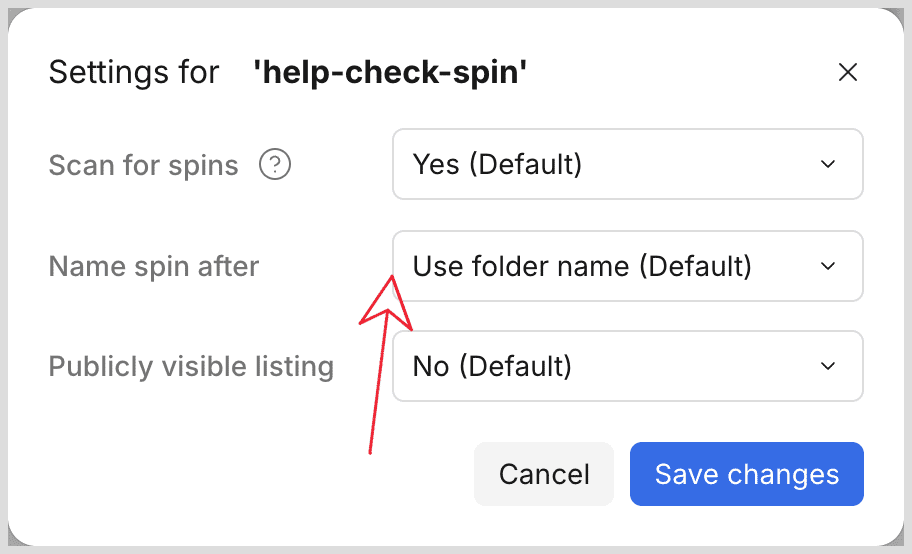
The same window has “Scan for spins”. It is on by default; set it to No for a folder where Sirv should never build spins.
Single row spin
Section titled “Single row spin”The above example image names will create a single row spin - also known as a 360 spin. It can be dragged from left to right. It cannot be dragged up and down. Most spins are single row spins. Example:
Multi-row spin
Section titled “Multi-row spin”Sirv can also generate multi-row spins - also known as 3D spins. They can be dragged up and down as well as left and right.
The first digits represent rows and the second represent columns. Drag this example up and down, as well as left to right:
Sirv always processes the first set of digits as the row and the second set as the column: If you upload a sequence of images such as this:| /10582501/adidas-01-01.jpg |
| /10582501/adidas-01-02.jpg |
| /10582501/adidas-01-03.jpg |
| /10582501/adidas-01-04.jpg |
| /10582501/adidas-01-05.jpg |
| /10582501/adidas-01-06.jpg |
| /10582501/adidas-01-07.jpg |
| /10582501/adidas-01-08.jpg |
| /10582501/adidas-02-01.jpg |
| /10582501/adidas-02-02.jpg |
| /10582501/adidas-02-03.jpg |
| /10582501/adidas-02-04.jpg |
| /10582501/adidas-02-05.jpg |
| /10582501/adidas-02-06.jpg |
| /10582501/adidas-02-07.jpg |
| /10582501/adidas-02-08.jpg |
Sirv will create a two-row spin with this name: /10582501/10582501.spin
Best-practice file naming
Section titled “Best-practice file naming”Spins have lots of files so to help you manage them, we recommend placing C/c, R/r or S/s before each set of digits.
They signify: R = Row C = Column S = Spin number This naming rule may be useful for:
- Descriptive file names - R and C let you instantly know what each set of digits represent.
- Multiple product spins - S signifies when a single product/item has multiple spins (e.g. different colours of the same product).
- Better collaboration - other team members can quickly understand what the digits represent.
For example, if you upload these two multi-row spins:
| /trainers/adidas-r01-c01-s01.jpg | /trainers/adidas-r01-c01-s02.jpg |
| /trainers/adidas-r01-c02-s01.jpg | /trainers/adidas-r01-c02-s02.jpg |
| /trainers/adidas-r01-c03-s01.jpg | /trainers/adidas-r01-c03-s02.jpg |
| /trainers/adidas-r01-c04-s01.jpg | /trainers/adidas-r01-c04-s02.jpg |
| /trainers/adidas-r01-c05-s01.jpg | /trainers/adidas-r01-c05-s02.jpg |
| /trainers/adidas-r01-c06-s01.jpg | /trainers/adidas-r01-c06-s02.jpg |
| /trainers/adidas-r01-c07-s01.jpg | /trainers/adidas-r01-c07-s02.jpg |
| /trainers/adidas-r01-c08-s01.jpg | /trainers/adidas-r01-c08-s02.jpg |
| /trainers/adidas-r02-c01-s01.jpg | /trainers/adidas-r02-c01-s02.jpg |
| /trainers/adidas-r02-c02-s01.jpg | /trainers/adidas-r02-c02-s02.jpg |
| /trainers/adidas-r02-c03-s01.jpg | /trainers/adidas-r02-c03-s02.jpg |
| /trainers/adidas-r02-c04-s01.jpg | /trainers/adidas-r02-c04-s02.jpg |
| /trainers/adidas-r02-c05-s01.jpg | /trainers/adidas-r02-c05-s02.jpg |
| /trainers/adidas-r02-c06-s01.jpg | /trainers/adidas-r02-c06-s02.jpg |
| /trainers/adidas-r02-c07-s01.jpg | /trainers/adidas-r02-c07-s02.jpg |
| /trainers/adidas-r02-c08-s01.jpg | /trainers/adidas-r02-c08-s02.jpg |
Sirv will create these 2 spins: /trainers/adidas-s01.spin /trainers/adidas-s02.spin
If you apply R and C references to your images but there is only 1 row or 1 column, those digits won’t change in your file names.
Therefore, Sirv won’t strip them from the file name. For example, this 1-row spin:
| adidas-R01-C01.jpg |
| adidas-R01-C02.jpg |
| adidas-R01-C03.jpg |
| adidas-R01-C04.jpg |
| adidas-R01-C05.jpg |
| adidas-R01-C06.jpg |
| adidas-R01-C07.jpg |
| adidas-R01-C08.jpg |
| adidas-R01-C09.jpg |
| adidas-R01-C10.jpg |
| adidas-R01-C11.jpg |
| adidas-R01-C12.jpg |
Will produce this spin file: adidas-R01.spin
If you wish to strip superfluous R01 or C01 entries in your .spin file names, you can right-click and use “Rename” to change the name.
You can also contact Sirv support and ask for R01 or C01 to be automatically stripped.
Custom spin detection
Section titled “Custom spin detection”If you use an image naming format that is not detected by default, Sirv offers custom spin detection algorithms for Enterprise accounts.
Continue using your existing file naming convention and Sirv will be customized to fit that convention. Please contact support with your requirements.
Replacing images in a spin
Section titled “Replacing images in a spin”If you upload one or more images with the same file name, the existing images will be overwritten and the cached spin images will be immediately invalidated.
The next time the spin is requested through the browser, it will be recreated using the latest images.
Corrupt or missing images
Section titled “Corrupt or missing images”A spin will be created even if one or more images are missing or corrupt. Sirv will detect the missing/corrupt image and skip it when the spin rotates.
A corrupt image notification will show on the Notifications page of your Sirv account. You should re-upload such images.
Technical explanation of spin files
Section titled “Technical explanation of spin files”From a technical perspective, spin files are JSON text files. They list the images to be included in your spin animation, plus any other settings or hotspots that you wish to apply.
.spin files can be visited directly in your browser and the spin will load. They can also be shared on social media.