Troubleshooting WordPress Issues
 By Anne-Marie Fletcher, Customer Success TeamUpdated
 Sirv for WordPress1. In WordPress, go to Plugins › Add New, search “Sirv”, then Install and Activate.2. Open the Sirv settings page and log in with your Sirv account, or create a free one right there.3. Click Enable, then Sync to copy your media library to Sirv.Open on WordPress.org
Short answer
Most issues come from other plugins or themes that change how scripts load. In WP Rocket, exclude Sirv JS from deferred and delayed loading, and turn off Cloudflare Rocket Loader, so your images appear. This page also covers fixes for Smart Image Resize for WooCommerce, Imagify and the Woostify theme.
After reading this you will know
- How to fix missing images caused by WP Rocket
- How to use Sirv with Cloudflare Rocket Loader and Imagify
- How to fix issues with Smart Image Resize and Woostify
Using Sirv with WP Rocket
Section titled “Using Sirv with WP Rocket”The Sirv plugin works well alongside the WP Rocket plugin, to improve page optimisation.
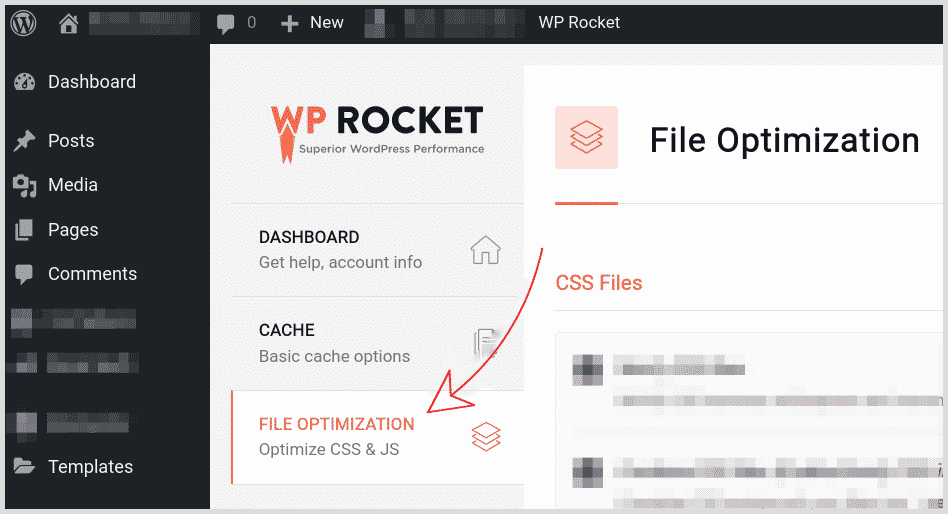
However, the options to Load JavaScript deferred and Delay JavaScript execution will prevent sirv.js from loading on page load, which can cause missing images. To solve this:
1. Navigate to the File Optimization section of your WP Rocket settings:
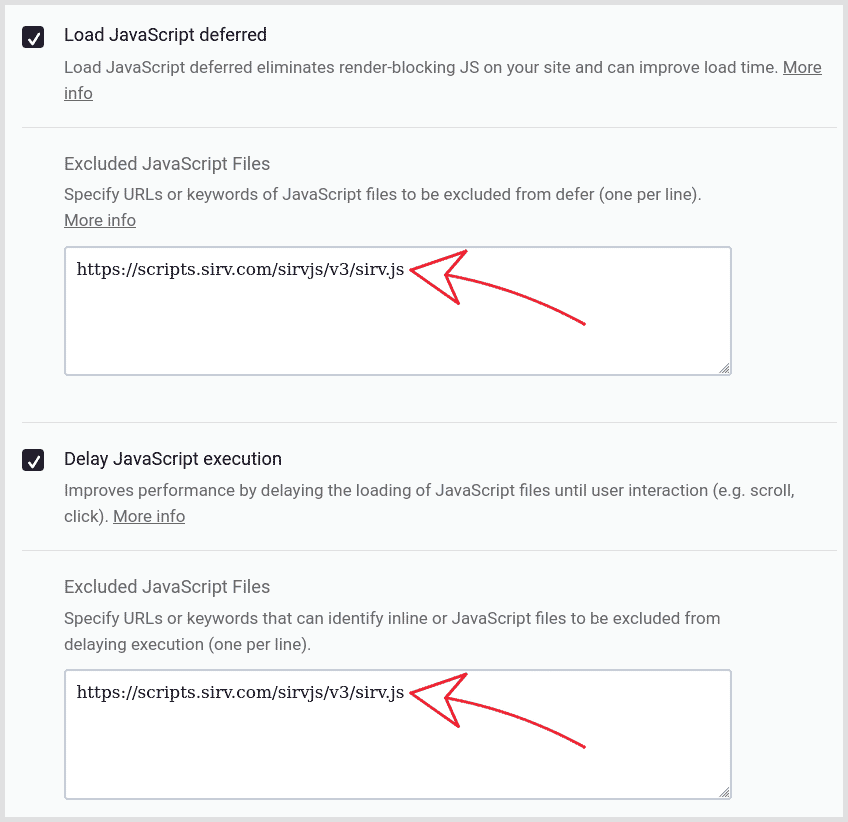
3. Then save those changes.
Smart Image Resize for WooCommerce
Section titled “Smart Image Resize for WooCommerce”The Smart Image Resize for WooCommerce plugin conflicts with Sirv and may prevent images from displaying correctly.
Deactivate it to resolve the issue: 1. Go to Plugins > Installed Plugins in your WordPress dashboard. 2. Locate Smart Image Resize for WooCommerce. 3. Click Deactivate.
4. Refresh your website and check if the Sirv images are displayed correctly.
Imagify
Section titled “Imagify”The Imagify plugin conflicts with Sirv’s functionality because both plugins handle image optimization. Running them together can cause issues with image delivery.
To ensure proper image loading, it is necessary to disable the Imagify plugin: 1. Navigate to Plugins > Installed Plugins in your WordPress dashboard. 2. Find Imagify in the list.
3. Click Deactivate. 4. Reload your website to verify if the images are loading as expected.
Cloudflare Rocket Loader
Section titled “Cloudflare Rocket Loader”Cloudflare’s Rocket Loader feature can interfere with Sirv script. To disable it: 1. Log in to your Cloudflare dashboard. 2. Navigate to Speed > Optimization.
3. Go to the Content Optimization tab. 4. Find Rocket Loader and disable it. 4. Refresh your browser and check if Sirv is functioning correctly.
Woostify Theme
Section titled “Woostify Theme”Certain settings in the Woostify theme may be incompatible with Sirv. To adjust the settings and resolve issues: 1. In your WordPress dashboard, go to Appearance > Customize.
2. Navigate to WooCommerce > Product Single > Product Images. 3. Under Gallery Layout settings, disable Gallery Lightbox Effect. 4. Change Gallery Style to Woocommerce Default.
5. Click Publish to save the changes. 4. Refresh your browser and check if Sirv is working as expected.