Fetch Files with API
 By Jake Brumby, Customer Success DirectorUpdated
Short answer
The fetch API copies files from any web address into your Sirv account. Send the remote URL and the folder and file name to save it as; up to 20 files per request, and missing folders are created. Existing files are not overwritten. You can fetch 1,000 to 2,000 files an hour, depending on your plan.
After reading this you will know
- How to fetch one or many files from URLs with the REST API
- What the response tells you, and the fetch limits
- How to handle errors and retries
The fetch API makes it easy to copy files from an HTTP address into your Sirv account, without uploading them yourself; auto-fetch does it automatically whenever a missing file is requested.
About the fetch API
Section titled “About the fetch API”The fetch API is one of more than 60 commands in the Sirv REST API. Useful links if you’re thinking of using the fetch API:
- Fetch API documentation - along with all other API commands.
- Postman API collection - quick way to play with Sirv API commands.
- Upload file API - to upload a local file instead of a remote URL, use the upload API, or GitHub Actions to upload from a repository.
Fetch a file from a URL
Section titled “Fetch a file from a URL”For each fetch request, you should submit two parameters:
- url - the URL of the file to be fetched.
- filename - the folder and file name of the file to be saved in your Sirv account.
Example:
{ "url": "https://www.un.org/sites/un2.un.org/files/aan_660.png", "filename": "/folder/path-to/my-new-image.jpg",}You can specify any folder path and filename - if the folders don’t already exist in your Sirv account, they will be created.
Multiple URLs in one request
Section titled “Multiple URLs in one request”Each fetch request can contain up to 20 file URLs. This request will fetch 3 images:
[ { "url": "https://www.w3schools.com/html/img_chania.jpg", "filename": "/Example-folder/Italian-backstreet.jpg" }, "url": "https://www.w3schools.com/html/img_girl.jpg", "filename": "/Example-folder/jacket-hat.jpg" }, "url": "https://www.w3schools.com/html/pic_trulli.jpg", "filename": "/Example-folder/Greek-villas.jpg" }]Got a CSV? If you have a CSV of URLs, an even easier solution is to use Sirv’s bulk upload tool. Every file listed in your CSV will be automatically uploaded to your Sirv account.
You can choose the folder structure, file names and you can enrich each file with meta data. See the CSV upload documentation.
HTTP authentication
Section titled “HTTP authentication”If the files are protected by HTTP authentication, your request should provide the username and password for authentication:
{ "url": "https://demo.sirv.com/Example-Folder/lv-M46197_PM2_Front.jpg", "filename": "/folder/path-to/my-new-image.jpg", "auth": { "username": "Example", "password": "StrongPassword%50", }}Example response
Section titled “Example response”Each fetch request will return a response that contains useful information in the header or body.
Response body
Section titled “Response body”The body of the response will contain the most important information. Of particular interest are:
- filename - the filename specified in your request.
- success - whether the file was successfully fetched (true/false).
- attempted - whether Sirv attempted to fetch the file (true/false). If a file with the same name already exists on Sirv, it will not be fetched.
- statusCode - if the fetch failed, the status code will help you decide what to do next.
- retryAfter - if the fetch failed, this states when a retry will be permitted.
Here is an example response body for 3 requests (1 succeeded, 1 was not attempted, 1 failed):
[ { "filename":"/folder/path-to/my-new-image.png", "success":true, "attempted":true, "attempts":[ { "url":"https://images.ctfassets.net/8cd2csgvqd3m/4PZg3P4irAYjVwAPcFIw9v/5d52752cda2a7304b748f0e5a5ee9733/Beosound_A5_-_PDP_-_Image_1.png", "initiator":{ "type":"api", "remoteAddr":"81.166.37.144", "userAgent":"PostmanRuntime/7.32.2", "date":"2023-06-10T10:31:12.585Z" }, "statusCode":200, "headers":{ "result":{ "version":"HTTP/2", "code":200, "reason":"" }, "date":"Sat, 10 Jun 2023 10:31:15 GMT", "content-type":"image/png", "content-length":"104952", "last-modified":"Sat, 10 Jun 2023 10:31:15 GMT", "etag":"\"648450f3-199f8\"", "access-control-allow-origin":"*", "access-control-allow-headers":"*", "expires":"Mon, 10 Jul 2023 10:31:14 GMT", "accept-ranges":"bytes" }, "contentLength":104952, "timing":{ "ns":0.007042, "connect":0.007407, "start":0.054624, "total":0.055398 }, "date":"2023-06-10T10:31:15.965Z" } ], "retryAfter":"2023-07-10T10:31:14.000Z" }, { "filename":"/Products/Dell/XPS-13.png", "success":true, "attempted":false, "attempts":[ { "url":"https://i.dell.com/sites/csimages/Video_Imagery/all/xps-13-9320-thumb.png", "initiator":{ "type":"api", "remoteAddr":"81.109.65.144", "userAgent":"PostmanRuntime/7.32.2", "date":"2023-06-09T20:16:14.292Z" }, "statusCode":200, "headers":{ "result":{ "version":"HTTP/2", "code":200, "reason":"" }, "date":"Fri, 09 Jun 2023 20:16:14 GMT", "content-type":"image/png", "content-length":"2018456", "last-modified":"Fri, 09 Jun 2023 20:16:14 GMT", "cache-control":"max-age=2591999", "etag":"\"6483888e-31476\"", "access-control-allow-origin":"*", "access-control-allow-headers":"*", "expires":"Sun, 09 Jul 2023 20:16:13 GMT", "accept-ranges":"bytes" }, "contentLength":2018456, "timing":{ "ns":0.006758, "connect":0.007059, "start":0.05164, "total":0.053263 }, "date":"2023-06-09T20:16:14.836Z" } ], "retryAfter":"2023-07-09T20:16:13.000Z" }, { "filename":"/Example/my-fetched-image.jpg", "success":false, "attempted":true, "attempts":[ { "url":"https://example.com/somewhere/something.jpg", "initiator":{ "type":"api", "remoteAddr":"81.109.65.144", "userAgent":"PostmanRuntime/7.32.2", "date":"2023-06-09T20:16:14.292Z" }, "statusCode":404, "headers":{ "result":{ "version":"HTTP/2", "code":404, "reason":"" }, "date":"Fri, 09 Jun 2023 20:16:14 GMT", "content-type":"text/html; charset=utf-8", "content-length":"4140", "vary":"Accept-Encoding", "etag":"W/\"102c-wKpRt+Cg9Cnw/NpTSkF5+w\"", "access-control-allow-origin":"*", "access-control-allow-headers":"*", }, "contentLength":4140, "timing":{ "ns":0.007738, "connect":0.008061, "start":0.027649, "total":0.027799 }, "error":{ "name":"Error", "message":"Request not successful: expected status code 200 but got 404" }, "date":"2023-06-09T20:16:14.489Z" }, { "url":"https://example.com/somewhere/something.jpg", "initiator":{ "type":"api", "remoteAddr":"81.109.65.144", "userAgent":"PostmanRuntime/7.32.2", "date":"2023-06-10T10:31:12.585Z" }, "statusCode":404, "headers":{ "result":{ "version":"HTTP/2", "code":404, "reason":"" }, "date":"Sat, 10 Jun 2023 10:31:15 GMT", "content-type":"text/html; charset=utf-8", "content-length":"4140", "vary":"Accept-Encoding", "access-control-allow-origin":"*", "access-control-allow-headers":"*", }, "contentLength":4140, "timing":{ "ns":0.006635, "connect":0.007103, "start":0.021783, "total":0.021908 }, "error":{ "name":"Error", "message":"Request not successful: expected status code 200 but got 404" }, "date":"2023-06-10T10:31:15.897Z" } ], "retryAfter":"2023-06-10T10:35:15.897Z" }]Response header
Section titled “Response header”The header will return a 200 response to show that the request was received.
It does not mean that the file(s) were successfully fetched - you should check the body for the status of each fetch. These are the most useful headers:
- X-Global-RateLimit-Reset - states when your hourly rate limit will refresh in 10-digit epoch time.
- X-Global-RateLimit-Limit - your global total API requests per hour.
- X-Global-RateLimit-Remaining - states how many global API requests are remaining - every type of API request counts 1 towards this limit.
Header example:
< HTTP/1.1 200< date: Sat, 10 Jun 2023 10:31:16 GMT< content-type: application/json; charset=utf-8< transfer-encoding: chunked< connection: keep-alive< x-global-ratelimit-limit: 7000< x-global-ratelimit-remaining: 1996< x-global-ratelimit-reset: 1686396672< access-control-allow-origin: *< access-control-expose-headers: *< cache-control: no-cache< vary: accept-encoding< content-encoding: gzip< server: Sirv.API< strict-transport-security: max-age=31536000Existing files will not be overwritten
Section titled “Existing files will not be overwritten”If a file already exists at the destination “filename” in your Sirv account then a fetch will not be attempted.
The “attempted” value in the API response tells you if a fetch was attempted. The example response below has an “attempted” value of false and a “success” value of true.
This means that the remote URL was found but the API did not attempt to upload it because a file already exists on Sirv:
[ { "filename": "/test/example-file-uploaded.png", "success": true, "attempted": false, "attempts": [ { "url": "https://demo.sirv.com/example.jpg", "initiator": { "type": "api", "remoteAddr": "82.6.187.69", "userAgent": "PostmanRuntime/7.43.0", "date": "2025-02-26T10:50:17.499Z" }, "statusCode": 200, "headers": { "result": { "version": "HTTP/2", "code": 200, "reason": "" }, "date": "Wed, 26 Feb 2025 10:50:18 GMT", "content-type": "image/jpeg", "content-length": "1040", "last-modified": "Wed, 26 Feb 2025 10:50:18 GMT", "cache-control": "max-age=2591999", "etag": "\"67bef1ea-410\"", "server": "Sirv.Imagination", "x-sirv-cdn-server": "sirvcdn-deu-1", "x-sirv-cdn-cache": "MISS", "x-sirv-server": "c1-extra2-fireball-9", "x-sirv-cache": "MISS", "access-control-allow-origin": "*", "access-control-allow-headers": "*", "expires": "Fri, 28 Mar 2025 10:50:17 GMT", "x-sirv-meta-width": "2000", "x-sirv-meta-height": "2000", "x-sirv-shard": "c1-riak1-new", "accept-ranges": "bytes" }, "contentLength": 1040, "timing": { "ns": 0.006128, "connect": 0.00647, "start": 0.231201, "total": 0.231268 }, "date": "2025-02-26T10:50:18.745Z" } ], "retryAfter": "2025-03-28T10:50:17.000Z" }]If you wish to replace an existing file in your account, you should first delete the file, then you can retry the fetch request. To delete the destination file, use the Delete file API command.
Example scripts
Section titled “Example scripts”The Fetch URL command in the API reference has sample code in 9 languages and a sample answer.
More scripts for this task:
Fetching limits
Section titled “Fetching limits”There are various limits to observe:
- Number of files per hour
- Size of files
- Time to fetch each file
Hourly fetching limit
Section titled “Hourly fetching limit”You can fetch 1000-2000 files per hour, depending on your account type. This is burstable, allowing triple the limit for 24 hours, once per month.
| Enterprise | Business | Trial | Free | |
|---|---|---|---|---|
| Fetch requests / hour | 2000 | 1000 | 1000 | None |
To increase your hourly limit, please describe your requirements to the Sirv support team.
File size limit
Section titled “File size limit”The size of the remote file is limited:
| Enterprise | Business | Trial | Free | |
|---|---|---|---|---|
| File size limit | 10 MB | 5 MB | 3 MB | - |
| Large files | 64 MB (20 files per hour) | 32 MB (10 files per hour) | 32 MB (10 files per hour) | - |
If you need to fetch larger files, please tell the Sirv support team how big your largest files are.
Time limit
Section titled “Time limit”Files should be fully returned within a time limit. An extra-long limit is provided for slow files.
| Enterprise | Business | Trial | Free | |
|---|---|---|---|---|
| Time limit | 10 seconds | 10 seconds | 10 seconds | - |
| Slow files | 30 seconds (20 files per hour) | 30 seconds (10 files per hour) | 30 seconds (10 files per hour) | - |
How to handle fetch errors
Section titled “How to handle fetch errors”A successful request will return a 200 response. If you receive an error response, follow the advice below:
-
401 - your API access token has probably reached its expiry. You can request a new bearer token and you can consider setting a longer bearer token expiry.
The default expiry is 20 minutes - you can increase it to as much as 7 days.
-
403 - the remote server refused access to the file. There are many possible reasons, such as forbidden access, rejected IP address or invalid configuration.
This probably won’t be resolved by retrying - you should contact the person responsible for the file.
-
404 - the file is missing from the server. Check that the URL is correct. If so, contact the person responsible for the file.
-
429 - too many requests, when your hourly fetch limit is reached. Wait until the limit refreshes, then continue submitting requests.
Your limit, current usage and reset time is shown in each response and also on your Usage page.
-
503/504 (header) - if Sirv’s response header returns a 5xx error, Sirv’s upload service may be overloaded.
This rare occurence will resolve itself after some time. Please wait 30 minutes and try again.
-
503 (body) - if a URL in the body has a status code 503, it means an error on the remote server could not return the file. It might work if you try again later.
-
504 (body) - the remote server terminated the request as a timeout. Contact the person responsible for the server - ask them to whitelist Sirv’s IP addresses or user agent.
-
Timeout was reached - Sirv timed out the request because the server didn’t return the file within the allowed time (10 or 30 seconds). Try again after 1 hour and the file might be successfully received.
-
SSL peer certificate or SSH remote key was not OK - the domain of the remote server does not have a valid SSL certificate.
This won’t be resolved by retrying - you should contact the person responsible for the server.
-
Number of redirects hit maximum amount - the remote server did not return the image - it redirected Sirv’s request to another location.
One redirect is permitted; a second redirect will fail. Do not retry this file as it will fail again.
Log the responses
Section titled “Log the responses”We recommend saving a copy of each response as it will help you to troubleshoot any issues.
Each response contains highly detailed information that will reveal exactly what happened and why an error occurred (if it occurred).
Wait before retrying
Section titled “Wait before retrying”If a file fails to be fetched, you must wait before retrying it. This is a protection mechanism to protect against flooding the API with excessive requests.
You can retry the file after 1 minute. If the second attempt also failes, you must wait 2 minutes, then 4 minutes, 9 minutes, 16, 25, 36, 49 minutes etc.
If a retry is attempted too soon, it will be counted as an attempt and you’ll have to wait longer, so please observe the retry time.
The retry time is shown as the retryAfter value in the body response, so you’ll know when the next attempt will be permitted.
Failure notifications
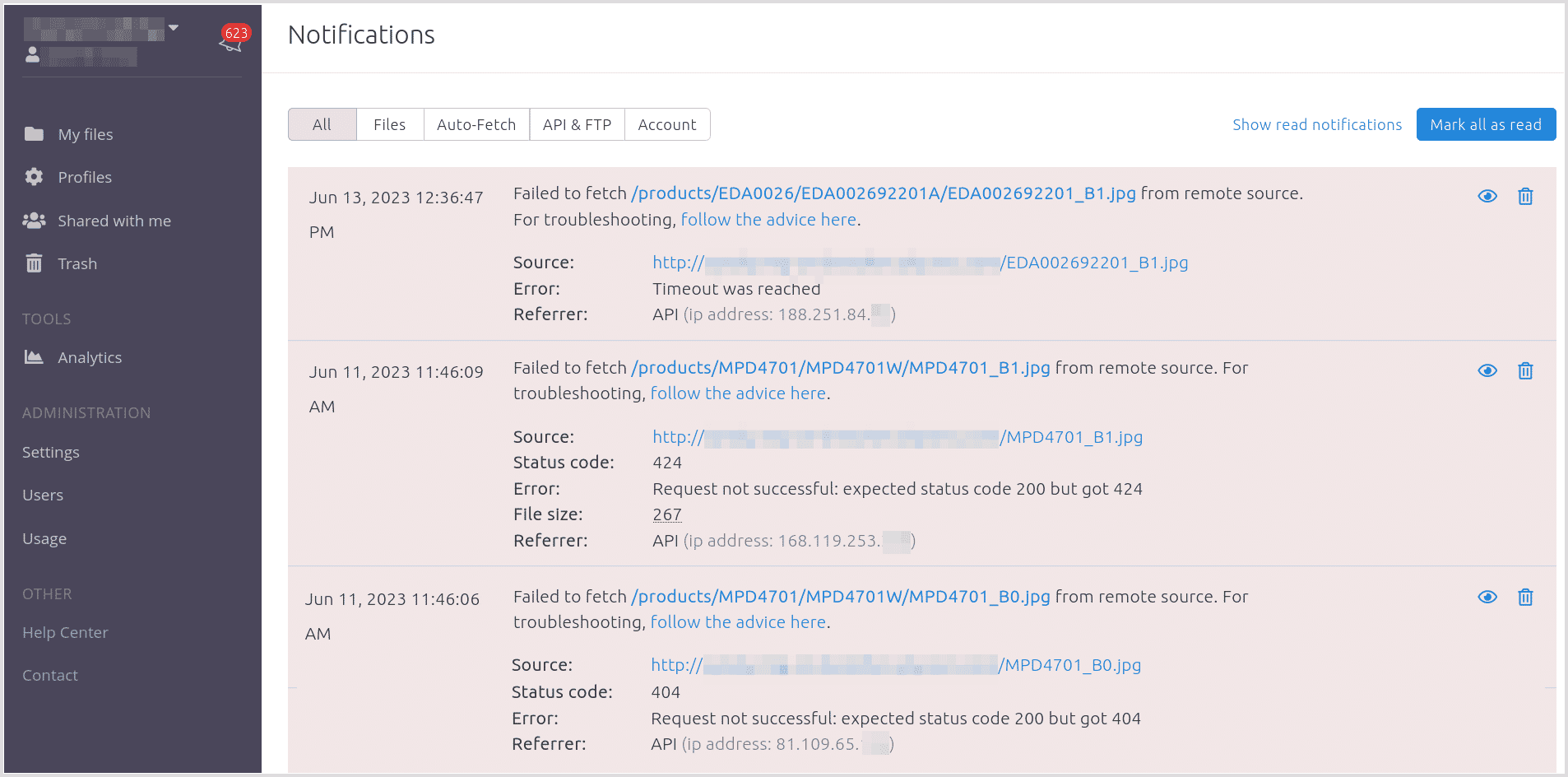
Section titled “Failure notifications”To help make you aware of a failed fetch, a notification will be displayed on your Notifications page. Notifications contain the source URL, referrer, status code and error code. Example:
Service information
Section titled “Service information”If you require a list of Sirv servers (IP addresses) used for fetching, send us a request via your account. The HTTP Referrer header field used by the Sirv agent is:
Sirv Image ServiceIf you don’t have a Sirv account yet, create your account today.