Users, Roles and Permissions (RBAC)
 By Anne-Marie Fletcher, Customer Success TeamUpdated
Short answer
Sirv has 7 user roles: Primary Owner, Owner, Admin, Billing Manager, Editor, Contributor and Viewer. Owners manage users and billing, Admins manage files and users but not billing, Editors handle daily file work, Contributors only add files, Viewers only view and download, and Billing users only see payments. Give each person their own login.
After reading this you will know
- What each of the 7 user roles can do
- Which role to give each person on your team
- How folder locks add extra protection
You can invite other people to access Sirv account from your users page. We recommend that each user has their own login and that logins are not shared with anyone else.
This allows you to control to your account, permitting you to easily remove users or change their permissions in the future.
Manage them on the Users page, under Settings. Click Invite new user to add someone, and filter the list by role:
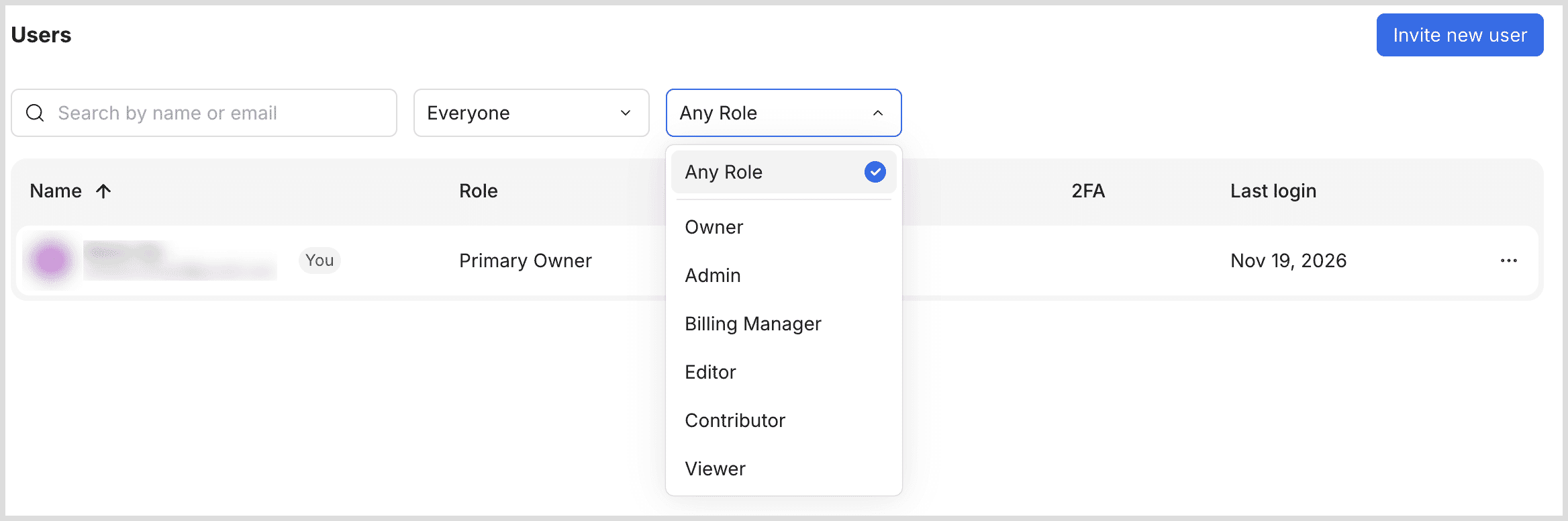
Sirv provides 7 predefined roles: Primary Owner, Owner, Admin, Billing Manager, Editor, Contributor and Viewer. Each role has permission to perform the tasks shown in the table below.
Assign the most suitable role to each user, giving them the most appropriate level of control and not more.
Table of roles and permissions
Section titled “Table of roles and permissions”| Primary Owner | Owner | Admin | Editor | Contributor | Viewer | Billing Manager | |
|---|---|---|---|---|---|---|---|
| File management | |||||||
| View files/folders | |||||||
| Download files/folders | |||||||
| Download CSV lists | |||||||
| Create folders | |||||||
| Upload files/folders | |||||||
| Move files/folders | |||||||
| Copy files/folders | |||||||
| Rename files/folders | |||||||
| Delete files/folders | |||||||
| Share folders | |||||||
| Share via link | |||||||
| Create/manage profiles | |||||||
| Empty trash | |||||||
| Lock/unlock folders | |||||||
| Change folder settings | |||||||
| Connectivity | |||||||
| Web app access | |||||||
| REST API access | |||||||
| S3 access | |||||||
| FTP access | |||||||
| Disable FTP | |||||||
| Account management | |||||||
| View analytics | |||||||
| View usage statistics | |||||||
| View usage statistics | |||||||
| Configure protected URLs | |||||||
| Configure Digimarc | |||||||
| Account email alerts | |||||||
| Change account name | |||||||
| Edit account details | |||||||
| Create sub-account | |||||||
| Transfer account ownership | |||||||
| Close account | |||||||
| User management | |||||||
| Invite new user | |||||||
| Remove user | |||||||
| Appoint admins | |||||||
| Demote admins | |||||||
| Appoint owners | |||||||
| Demote owners | |||||||
| Billing | |||||||
| View invoices | |||||||
| Change billing plan | |||||||
| Manage payment method | |||||||
| Manage billing details | |||||||
| Billing email alerts | |||||||
| Email notifications | |||||||
| Weekly 40x error summary |
The 7 user roles
Section titled “The 7 user roles”Primary Owner
Section titled “Primary Owner”The person who creates the account automatically becomes the Primary Owner. They have total control over the account and only they can transfer ownership to another user.
Unlike other roles, there can only be one Primary Owner per account.
Senior managers of your team with responsibility for adding new users, maintaining existing users and billing can be added as owners.
Owners have almost full control over the account. An account can have multiple owners.
Technical administrators have complete control over the files in the account (on Enterprise plans, any user can be limited to specific folders). They can appoint new users and change existing user roles, except Owner roles.
They cannot view or manage any billing information. Admins can lock/unlock folders (Enterprise accounts only), making this a powerful role.
Editor
Section titled “Editor”This role gives access to all the day-to-day file management operations (upload, delete, rename, move and copy).
Editors are unable to empty the trash, so if files are deleted in error, an Owner or Admin user is able to retrieve them for 30 days.
If a folder has been locked, Editors and Contributors cannot delete, rename or overwrite any of its files or subfolders.
Contributor
Section titled “Contributor”A limited role, Contributors can add content to your account - uploading and creating new folders and files. They cannot move, copy, rename or delete any files/folders.
Viewer
Section titled “Viewer”A very limited role, Viewers can only view files and download them.
Billing Manager
Section titled “Billing Manager”Ideal for finance and accounting staff, this role gives complete payment and billing capability, with no file capability.
Lock folders to protect them
Section titled “Lock folders to protect them”For even greater protection of your files, Enterprise plans permit folders to be locked from any changes. Contact us today to discuss upgrading your account to an Enterprise plan.
If you don’t have a Sirv account yet, start your trial now.