REST API Overview
 By Jake Brumby, Customer Success DirectorUpdated
Short answer
The Sirv REST API has more than 60 commands to upload, download, rename, move, copy, delete and search files and manage your account. Create an API client in Settings > API access, send its client ID and secret to get a bearer token, then add the token to each request. Each plan has an hourly request limit.
After reading this you will know
- How to create an API client and get a bearer token
- What the API can do, with sample scripts
- The hourly limits, how to handle errors, and how to limit a key's scope
Sirv’s REST API provides you with more than 60 commands for managing your account and your files (upload, download, rename, delete, move, copy, search etc.).
Create an API client
Section titled “Create an API client”To use the Sirv REST API, you need an API client. An API client is comprised of a clientId and clientSecret.
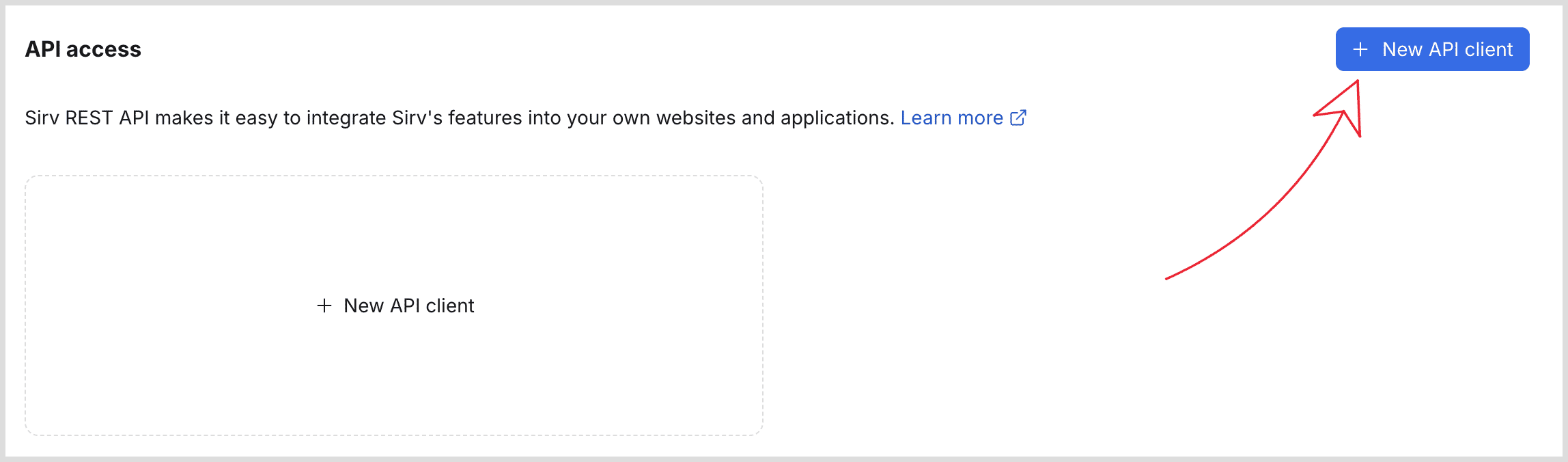
To create an API client or use an existing client, go to Settings > API access in your Sirv account and click “New API client”:
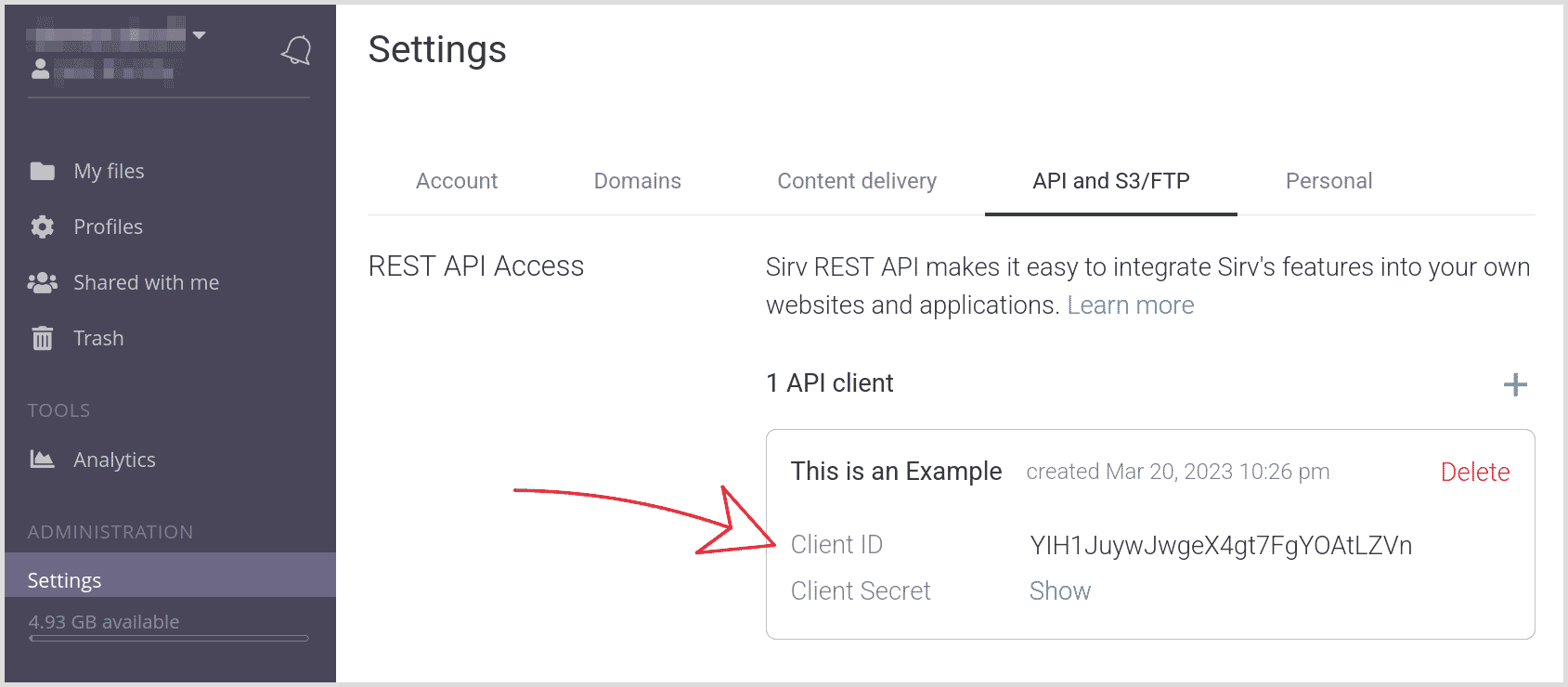
Once created, you’ll see your Client ID and Client Secret:
By default, API clients have full access to use any API method. Instead, it is possible to restrict the scope to specific API methods. See list of scopes.
Get a bearer token
Section titled “Get a bearer token”Each API call must be authenticated with a bearer token (JSON Web Token).
You can get a token by submitting a POST request to the Sirv API, using your preferred programming language, or with no code in Postman. The following example script uses Curl to request a token:
curl --request POST \ --url https://api.sirv.com/v2/token \ --header 'content-type: application/json' \ --data '{ "clientId": "LW82h5FESf4iYmDYeJUjGjsIf8P", "clientSecret": "YOUR_CLIENT_SECRET"}'The Sirv API will respond with: a bearer token; the token duration; and its scope:
{ "token": "eyJhbGciOiJIUzI1NiIsInR5cCI6IkpXVCJ9…", "expiresIn": 1200, "scope": [ "account:read", "account:write", "user:read", "user:write", "billing:read", "billing:write", "files:read", "files:write", "files:create", "files:upload:multipart", "files:sharedBilling", "videos", "images" ]}Once you have a token, you can use any of the 60+ Sirv REST API methods. You can use the token repeatedly until it expires. Once your token has expired, request a new token to continue using the API.
Change token expiry
Section titled “Change token expiry”Tokens expire after 20 minutes by default. The token expiry time is returned in the expiresIn field after you submit a successful token request.
You can change the expiry to between 5 and 604800 seconds (7 days) by setting the expiresIn parameter. This example script will request a token with a 30 second expiry:
curl --request POST \ --url https://api.sirv.com/v2/token \ --header 'content-type: application/json' \ --data '{ "clientId": "LW82h5FESf4iYmDYeJUjGjsIf8P", "clientSecret": "YOUR_CLIENT_SECRET", "expiresIn": 30}'API methods
Section titled “API methods”With your bearer token, you can use more than 60 different Sirv REST API methods. Each method is described in the API docs at Sirv REST API reference.
You can see a summary of each method, how it can be used and a list of properties that can be set. Additional documentation is available for some API methods.
The search API documentation describes the many ways of searching your Sirv account, with detailed descriptions and examples.
The upload API documentation describes the two different API methods for uploading local files to Sirv, plus limitations and best-practices.
The fetch API documentation describes how to upload files to Sirv from a remote URL. It explains the important factors you should account for when fetching files from a URL.
Sample scripts
Section titled “Sample scripts”There are many example scripts provided at the documentation links above. Additional example scripts are also provided for these languages:
REST API limits
Section titled “REST API limits”The Sirv REST API has a limit to how many requests can be returned per hour. Enterprise plan limits:
- Total requests per hour: 14000
- Search requests: 2000
- Video to spin conversions: 400
- Spin to video conversions: 400
- Fetch requests: 4000
Business plan limits:
- Total requests per hour: 7000
- Search requests: 1000
- Video to spin conversions: 200
- Spin to video conversions: 200
- Fetch requests: 2000
Free plan limits:
- Total requests per hour: 500
- Search requests: 50
- Video to spin conversions: 20
- Spin to video conversions: 20
- Fetch requests: 300
The total requests per hour is for all types of request combined. The hour starts counting from the time that the first request is received by Sirv.
For example, if a request is received at 18:35:51, the API allowance will be reset at 19:35:51. Check your current REST API usage on the Usage page of your Sirv account.
If you exceed your limit, you will receive 429 responses. See the guide below on how to handle 429 and other errors.
Check API usage
Section titled “Check API usage”Use the API method below to check all types of limit across your account (REST API limits, S3 API limits and FTP limits).
- Endpoint: https://api.sirv.com/v2/account/limits
- Documentation: Get API limits
The API method will return:
- Your limit
- Number of requests in last hour
- Number of requests remaining
- Time when limit will reset (UTC epoch seconds)
Error handling guide
Section titled “Error handling guide”Proper error handling is essential to building high quality applications and a seamless end-user experience.
Each Sirv response contains a standard response code, to indicate the type of error, with JSON or plaintext bodies.
Causes and resolutions
Section titled “Causes and resolutions”400 - Bad Request
Section titled “400 - Bad Request”A 400 error could be caused from a malformed JSON request body or JSON that does not conform to input fields and validation.
400 errors may also be returned to a user without permission to use the REST API.
Responses with error code 400 suggest an issue with the request itself, so they won’t be resolved by retrying.
401 - Unauthorized
Section titled “401 - Unauthorized”A 401 error is returned when the bearer token is invalid or has expired. You can choose an expiry between 5 and 604800 seconds (7 days).
By default, tokens will expire after 20 minutes. Retrying a 401 will not succeed.
If your application receives a 401 response, it should get a new token then try again. Example response headers:
date: Sat, 27 Apr 2024 09:55:07 GMTcontent-type: application/json; charset=utf-8content-length: 132www-authenticate: Token error="Expired token"access-control-allow-origin: *access-control-expose-headers: *cache-control: no-cacheserver: Sirv.APIExample response body:
{ "statusCode": 401, "error": "Unauthorized", "message": "Expired token", "attributes": { "error": "Expired token" }}429 - Rate Limit (Too Many Requests)
Section titled “429 - Rate Limit (Too Many Requests)”A 429 error means that your API usage has reached its hourly limit. Your hourly limit and current usage is shown on the Usage page of your account.
You can also retrieve this information via an API limit request (it will work even if your account has reached its hourly limit).
Sirv API limits are generous, so your application is unlikely to hit them.
However, we recommend that your script is written to deal with 429 errors, by pausing your requests and waiting until your hourly limit refreshes.
To help you do this, every Sirv REST API response contains the following headers:
X-RateLimit-Limit- the hourly request limit.X-RateLimit-Remaining- the number of requests remaining in the current hour.X-RateLimit-Reset- a UNIX timestamp (in seconds) for when the limit will be reset.X-RateLimit-Type- the type of request this limit relates to e.g.rest:post:files:search.
The header information above is also duplicated in the JSON structure.
The error message includes a “Retry after” timestamp, in human readable format, so you can pause requests and resume after the retry time.
If you’re incurring 429 errors due to a large one-time migration of files, you can request a temporary higher limit.
500 - Internal Server Error
Section titled “500 - Internal Server Error”Internal server errors are rare, undefined errors on the Sirv side. Such errors should be brief. If you see 500 errors for an extended period, please check https://status.sirv.com/ or contact the Sirv support team.
502 - Bad Gateway
Section titled “502 - Bad Gateway”If you receive a 502 response, you should retry the request a few times and it may succeed. If a 502 is returned repeatedly many times, then slow down or pause your requests.
It may be that a server is unhealthy or misconfigured and this issue will be resolved soon by the Sirv team.
503 - Service Unavailable
Section titled “503 - Service Unavailable”If an API service is overloaded, a 503 error might be returned. Overloads are rare and will self-heal, typically within a few minutes.
If you receive a 503 error, try again in 15 or more minutes. If you see 500 errors for an extended period, please check https://status.sirv.com/ or contact the Sirv support team.
Best Practices
Section titled “Best Practices”Log your requests/responses
Section titled “Log your requests/responses”Track your error rates. While some types of 4xx errors may occur occasionally, high error rates indicate problems in your application and it should be optimized.
All Sirv API calls (whether successful or 4xx) return useful headers in their responses. If you need help from Sirv support, share these headers to help speed up troubleshooting.
Logging your responses will give you a clear understanding of your API usage, how to optimize your application and solve problems.
Test all error types
Section titled “Test all error types”When building your application, test all the error types above. This is an important best-practice measure, to ensure your application runs smoothly.
Retry failed requests
Section titled “Retry failed requests”If your script receives any 429 responses, resubmit those requests once your hourly limit has refreshed.
Swagger endpoint
Section titled “Swagger endpoint”Sirv provides the following Swagger OpenAPI Specification JSON file: https://api.sirv.com/swagger.json It describes the entire API, including:
- Authentication, to get an API access token
- Available endpoint paths and operations on each endpoint (GET and POST)
- Operation parameters and responses for each operation
Limited scope API keys
Section titled “Limited scope API keys”The API clients which you create in your Sirv API settings have full scope to perform any of the API commands.
It is also possible to have limited scope API keys, with any combination of the following capabilities:
- File management - read
- File management - write (upload/create, overwrite, rename, move, copy, delete)
- File management - create (upload/create)
- File management - sub-accounts (access files on sub-accounts)
- Account management - read
- Account management - write
- User management - read (get list of users)
- User management - write (add/change users/roles)
- Billing management - read (get plan/invoice details)
- Billing management - write (change billing plan)
- Image operations - (background removal, image preprocessing)
- Video operations - (HLS stream management, video to spin conversion)
Ask the support team if you require a limited scope API key.
Special API options
Section titled “Special API options”Sirv also provides special API methods, available upon request. Please contact Sirv support if you need access to:
- Create new accounts
- Get user credentials
- Get list of a users’ accounts