Protect Images from Copyright Theft
 By Jake Brumby, Customer Success DirectorUpdated
Short answer
No website can stop every copy of an image, but Sirv makes copying much harder. Limit which domains can show your files, tile large zoom images, use expiring JWT signed URLs, add visible or invisible watermarks, keep copyright metadata, and slow down or block scraping bots. Combine the methods that suit your images.
After reading this you will know
- Nine ways to protect your images from being copied or hotlinked
- How watermarks, signed URLs and domain limits work on Sirv
- How to spot and block scraping bots
You may be wondering how to prevent your images from being scraped, leeched or otherwise saved and reused without your permission.
By its nature, the web is an open platform, making it almost impossible to totally prevent your images from being saved by a visitor.
Once an image has been received by a users browser, it exists in their browser cache, which could easily be saved by the user if they know how to access the image.
However, Sirv provides multiple ways to either block users from accessing your files (for example with a password) or make it harder for them (and bots) to save your copyrighted images.
1. Restrict which domains can serve your images
Section titled “1. Restrict which domains can serve your images”Hotlinking to a file on another website without consent is known as “leeching”. Your files on Sirv are open to be requested by any site, so they could be embedded anywhere.
This is the default for all web servers - the web is open for all. To prevent this, enable Sirv’s domain restriction feature to choose which domains can display your images.
Domain restriction can also block direct requests and search engine bots.
The following image is from an account using domain protection, so it returns a 403 forbidden error: https://demo-protected.sirv.com/important-image.jpg

Referrer restriction will allow the file to be served to whitelisted domains that you choose.
However, the images served in the web pages of those domains can still be saved by the recipient or scraped by bots, so read on to learn what other protections you can use…
2. Enable image zoom tiling
Section titled “2. Enable image zoom tiling”If you’re using Sirv’s image zoom feature, you can protect your big zoomable images by enabling image tiling.
Sirv will serve your image sliced into lots of little square images, so that the users’ browser does not receive the large image.
This is very effective when combined with domain restriction (see item 1 above), to prevent a person from editing the URL to request the full size image.
Another protective feature of Sirv’s image zoom is that the right-click “Save image” is disabled, making it harder for a user to download an image.
3. Create JWT signed URLs
Section titled “3. Create JWT signed URLs”Sirv can prevent a file/files from being served unless they have a special token in the URL.
JWT tokens expire after an amount of time that you choose. They can also contain image parameters (such as watermarks) which cannot be removed.
This is a very powerful tool that would normally be complicated to implement, but Sirv has made it very accessible for developers. Follow the steps to create JSON Web Tokens.
4. Watermark your images
Section titled “4. Watermark your images”Sirv makes it easy to brand your images with a logo or text watermark. Choose the location, style, opacity and size.
Watermarks can be applied either via the URL or a profile (recommended if you have many images).
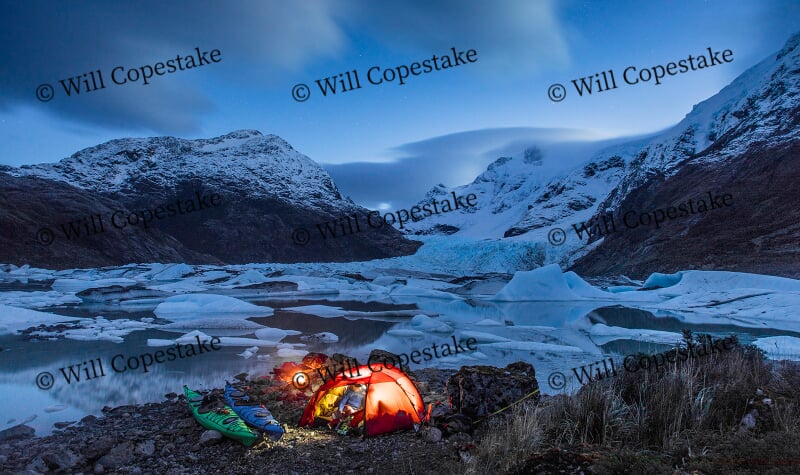
Credit: Will Copestake & Sidetracked
Watermarks could be stripped from an image by editing the URL parameters, so to prevent this, you can apply a strict profile. This profile will apply to all images in a folder (and its subfolders).
Enable it in the Delivery settings of your Sirv account.
5. Invisibly watermark your images
Section titled “5. Invisibly watermark your images”To avoid obscuring your images with a visible watermark, you can apply a hidden watermark.
Digimarc is a third party service that provides image watermarking that humans cannot see but software can.
Sirv can automatically apply Digimarc to your images, which can then be identified by Digimarc in future.
Digimarc is designed for Enterprise usage, with typical cost starting from $2000/month. Contact Digimarc to discuss your requirements.
6. Disable meta stripping
Section titled “6. Disable meta stripping”One of the many optimizations Sirv makes to serve images as fast as possible is to remove meta data.
If your meta data contains copyright or other important information, you can set Sirv to keep the meta in your optimized images.
It won’t stop people using images without your permission but it can help people find out who owns the image so they can ask to license it from you.
Edit your Default profile and open Format. Turn on the switch next to “Strip image metadata”, set it to “Disabled” and click Save changes:

7. Use rate limiting to slow down scraping bots
Section titled “7. Use rate limiting to slow down scraping bots”Scraping is a technique performed by bots to go through a website page by page and save information from it.
To protect your images from being scraped by a bot, identify the bots and block them from accessing your files.
A very determined scraper could try and avoid detection of its activity, but you can successfully discourage bots by making it hard for them.
It’s important to do this in a way that distinguishes between genuine traffic and scraping traffic, to avoid blocking real users and search engines.
Rate limiting can be configured on your server, to limit the number of web pages served to IPs showing suspicious activity. Learn more in this Guide to preventing Webscraping.
8. Block scraping bots
Section titled “8. Block scraping bots”Sirv blocks all known scraping bots. However, new bots can be created and existing bots can camouflage their activity.
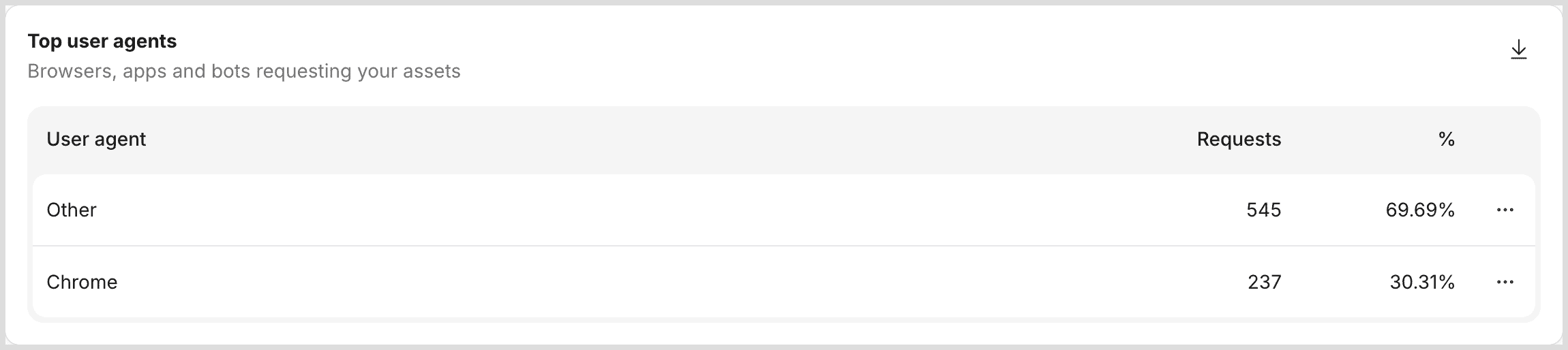
To stay ahead of the bots, check the “Top user agents” table on Analytics > Traffic. It lists the browsers, apps and bots requesting your files, so you can spot any that request an unusually high number.
Investigate their authenticity and report them to Sirv if you believe there may be misuse. Your Top user agents table looks like this:
9. Block good bots
Section titled “9. Block good bots”Bots should follow the rules in your websites’ robots.txt file. Bad bots won’t but good bots will.
This will prevent your images from being indexed and shown in Google Image search results and other image search engines.
To tell bots not to index any of your images, disallow specific file type extensions in your robots.txt file:
User-agent: *Disallow: *.jpgDisallow: *.pngDisallow: *.gifIf you would like major search engines such as Google Images to index your images, you can disallow all bots by default and specifically allow certain bots, like so (Slurp is Yahoo’s bot):
User-agent: GooglebotAllow: /
User-agent: Googlebot-imageAllow: /
User-agent: BingbotAllow: /
User-agent: msnbotAllow: /
User-agent: SlurpAllow: /
User-agent: PinterestbotAllow: /
User-agent: *Disallow: /
Save these rules in your robots.txt file, and good bots stop indexing your images the next time they crawl your site.