Serve Images from Your Custom Domain
 By Jake Brumby, Customer Success DirectorUpdated
Short answer
Add your domain in Settings > Delivery of your Sirv account. Then, at your domain provider, create a CNAME record that points your subdomain, such as cdn.yourwebsite.com, to your Sirv subdomain. After about 10 minutes, click "Verify my domain". Sirv adds a free SSL certificate automatically. Custom domains work on paid and trial accounts.
After reading this you will know
- How to add a custom domain in your Sirv account
- How to create the CNAME record at your domain provider
- What changes once the domain is verified
- How the free SSL certificate renews, and what to check if it fails
Your files are served from a subdomain of sirv.com, which you can control by changing your account name.
For example, the account name mikes-bikes will serve images from mikes-bikes.sirv.com. Instead, you can serve your images, videos and other files from a subdomain of your own website, for example:
- images.yourwebsite.com
- cdn.yourwebsite.com
- media.yourwebsite.com
Or use a completely separate domain that you own:
- yourwebsitemedia.com
Configure your CNAME
Section titled “Configure your CNAME”1. Go to Settings > Delivery in your Sirv account, click Manage, then Set up next to Custom domain:
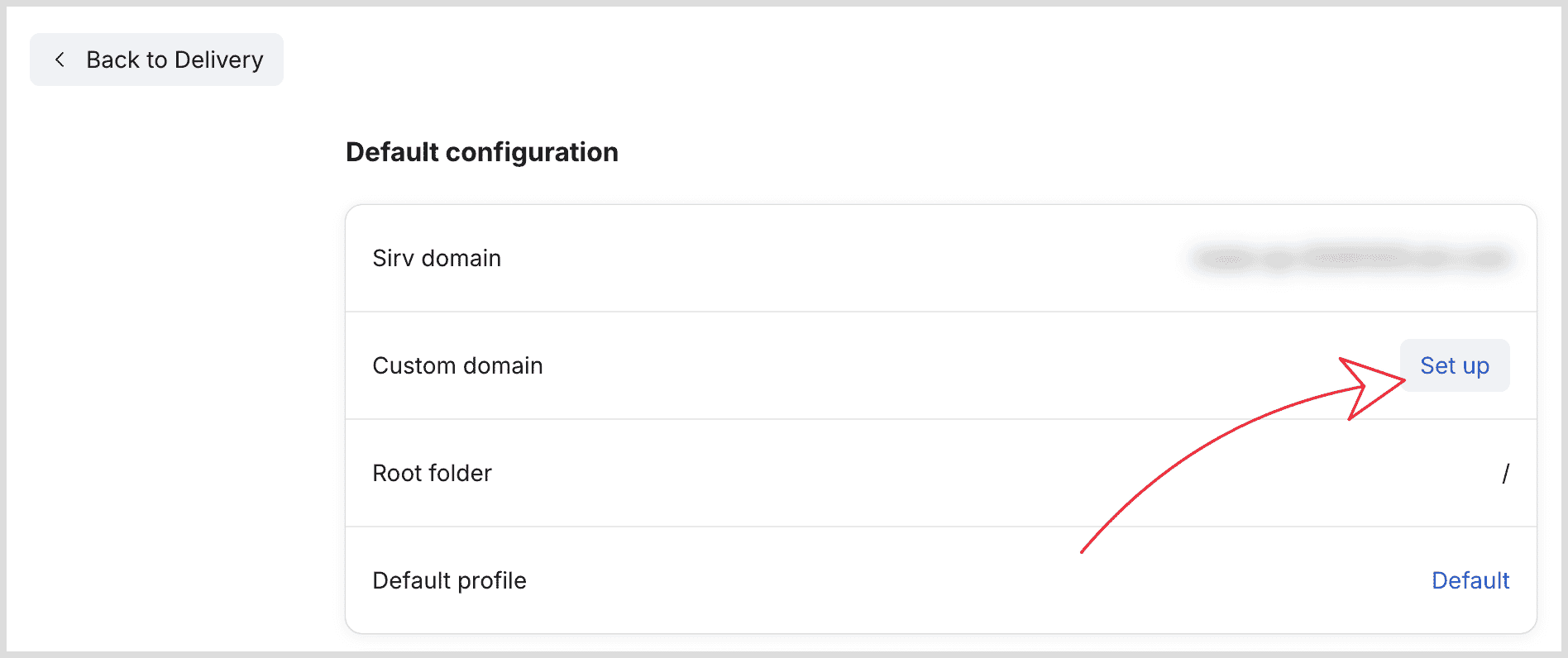
Custom domains come with paid plans and the trial. On the Free plan, Set up opens a window asking you to upgrade to Business 5.
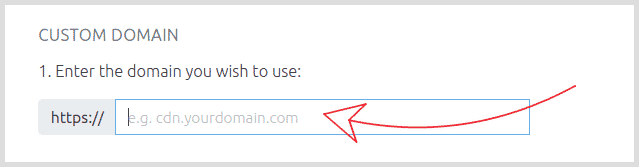
2. Enter the domain you wish to use:
3. Now login to the control panel of your domain name provider, to configure a new CNAME record.
Find the option to edit your DNS records and add a CNAME record pointing your chosen subdomain to your Sirv subdomain, which is shown here:
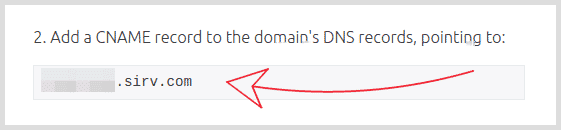
Some domain name providers might require the full CNAME record, which would look like this: cdn.yourwebsite.com. 300 IN CNAME example-account.sirv.com.
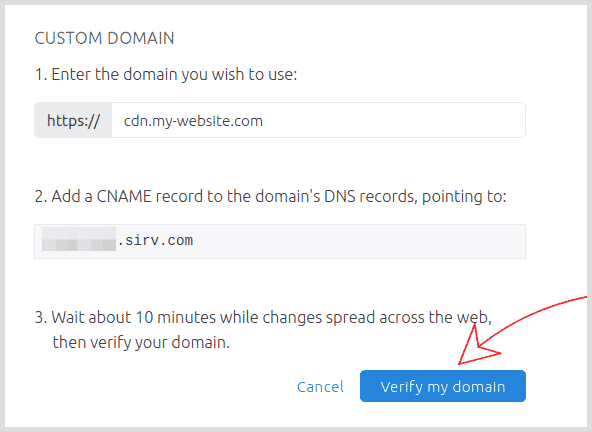
4. Wait about 10 minutes while your new DNS settings propagate around the internet, then click “Verify my domain”. (To track progress, you can use a CNAME checker.)
Configuration in Cloudflare
Section titled “Configuration in Cloudflare”Your CNAME should be configured with your domain registrar - the service where your domain is registered and renewed.
If your domain was registered with Cloudflare follow the instructions to configure your CNAME in Cloudflare.
Your new subdomain
Section titled “Your new subdomain”After your custom domain has been verified, it will be usable immediately. All links in your account will use your new domain, with the same folder paths. Your sirv.com subdomain will also continue to work.
Please note that custom domains are available for paid and trial accounts, not free accounts.
If you configure a custom domain while on a 30 day trial, you must upgrade to a paid account before your trial period ends, otherwise your domain settings will be lost and your custom domain will stop working.
Changing your account name
Section titled “Changing your account name”Once you have configured a custom domain, your account name can’t be changed.
If you’d like to change your account name, remove the custom domain, then change your account name, then add your custom domain again.
Additional custom domains
Section titled “Additional custom domains”Multiple custom domains can be added to your account. Learn more about adding additional domains to your account.
Automatic SSL certification
Section titled “Automatic SSL certification”To permit files to be served over HTTPS secure connections, Sirv issues your account with a free SSL certificate from the Lets Encrypt Certificate Authority.
Automatic SSL renewal
Section titled “Automatic SSL renewal”Your certificate will be registered for 90 days, then automatically renewed every 60 days.
Ensure that your CNAME record remains correctly configured, otherwise the automatic SSL certificate renewal will fail.
Failed renewal
Section titled “Failed renewal”If renewal fails for 21 days, a notification will be shown on your Notifications page. If your certificate has failed to renew, possible causes are:
- Temporary error - the renewal may have failed due to a rate limit, communication error or another temporary issue. Sirv automatically retries each day, so renewal may succeed soon.
- CNAME record has changed - use a CNAME checking tool to verify if your CNAME record points to your Sirv domain.
- DNS CAA record prevents issuance - if your domain uses CAA to specify which Certificate Authorities may issue certificates, add a CAA record permitting letsencrypt.org.