How to add 360 GIFs on eBay
 By Anne-Marie Fletcher, Customer Success TeamUpdated
Short answer
eBay can't show an interactive spin, but it can show an animated image of it. Upload the spin's photos to Sirv, copy the spin URL ending in .spin, and add ?image to the end. Sirv serves the rotation as an animated image, which you add to your eBay listing like any other picture.
After reading this you will know
- How to turn a 360 spin into an animated image for eBay
- How to add it to an eBay listing
How to embed spin GIFs in eBay listings
Section titled “How to embed spin GIFs in eBay listings”
Since 1995, people have been selling on eBay. With 2 billion items sold on eBay every year, GIFs are a powerful way to help your products stand out from all the other listings.
Animated content engages customers and motivates them to buy. See how beautiful this spinning ring is:
With Sirv, you can quickly add beautiful animated GIFs to your eBay descriptions. They will be displayed on all eBay channels including:
- eBay website
- eBay mobile site
- eBay iOS and Android apps
Add animated 360 GIFs on eBay
Section titled “Add animated 360 GIFs on eBay”- Log in to your Sirv account or create an account.
- Upload the set of photos for your spin (or go to a spin you uploaded earlier).
- Click … on the spin and choose Copy link:
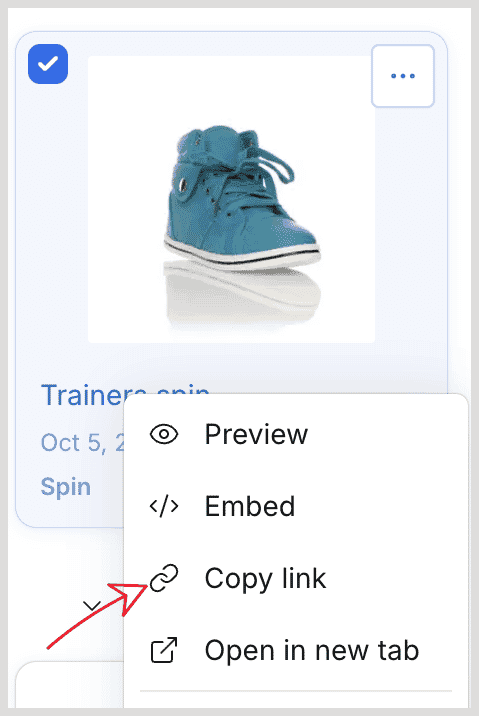
The link ends in .spin. For example:
https://demo.sirv.com/ring/ring.spin-
Add ?image to the end of the URL - that tells Sirv to serve it as a GIF.
Also add the size for the GIF using either &w=300 or &h=300 (where 300 is the number of pixels for the width or height). For example:
https://demo.sirv.com/ring/ring.spin?image&h=300- Add an img tag, just like usual when you add an image in HTML. It’ll look like so:
<img src="https://demo.sirv.com/ring/ring.spin?image&h=300" />For a smaller GIF, use fewer frames and some compression, as the GIF tab of the spin’s Embed window does: ?image=36&gif.lossy=5&h=300.
For this ring, that’s 349 KB instead of 688 KB (tested 20 Nov 2026).
You could go one step further and add a link to the interactive spin, like so:
<a href="https://demo.sirv.com/ring/ring.spin" target="_blank"><img src="https://demo.sirv.com/ring/ring.spin?image" /></a>- Go to the Description section of your eBay listing and paste the code into the HTML editor. In case you need help, send a message to the Sirv customer support team.
Why use Sirv for eBay images?
Section titled “Why use Sirv for eBay images?”Sirv is the best image hosting service for eBay images.
- Host any image - not only animated GIFs, you can host any image (JPEG, PNG etc) to bring your eBay listings to life, with image zoom too.
- Works on eBay apps - images will be perfectly displayed on all eBay apps for iOS and Android, as well as the eBay website.
- Use it for your other websites - use your Sirv account to serve images to all your other websites too.
- AVIF and WebP images - browsers that support them automatically get AVIF or WebP images, which are smaller and have better quality.
Your Sirv account
Section titled “Your Sirv account”Get started by creating your Sirv account now. New accounts receive 5GB free storage for 30 days. View all the Sirv price plans to choose the most suitable plan for you.