How do I add hotspots to a 360 spin?
 Answered by Jake Brumby, Customer Success DirectorLast checked 26 Nov 2026
Short answer
Ask Sirv support to turn on the hotspot editor in your account. Then right-click the .spin file, choose Add/Edit hotspots and click the spin to place each hotspot on the first frame, one in the middle and the last. Sirv works out the frames in between. Add a tooltip or message, then click Save.
If you want shoppers to click parts of a product as it turns, add hotspots to its 360 spin.
How do I add a hotspot?
-
Ask Sirv support to turn on the hotspot editor in your account. Spin hotspots come with paid plans.
Business plans can have up to 500 hotspots, and Enterprise plans have no limit (Sirv pricing page, checked 23 Oct 2026).
-
In your Sirv account, right-click the
.spinfile and choose “Add/Edit hotspots”.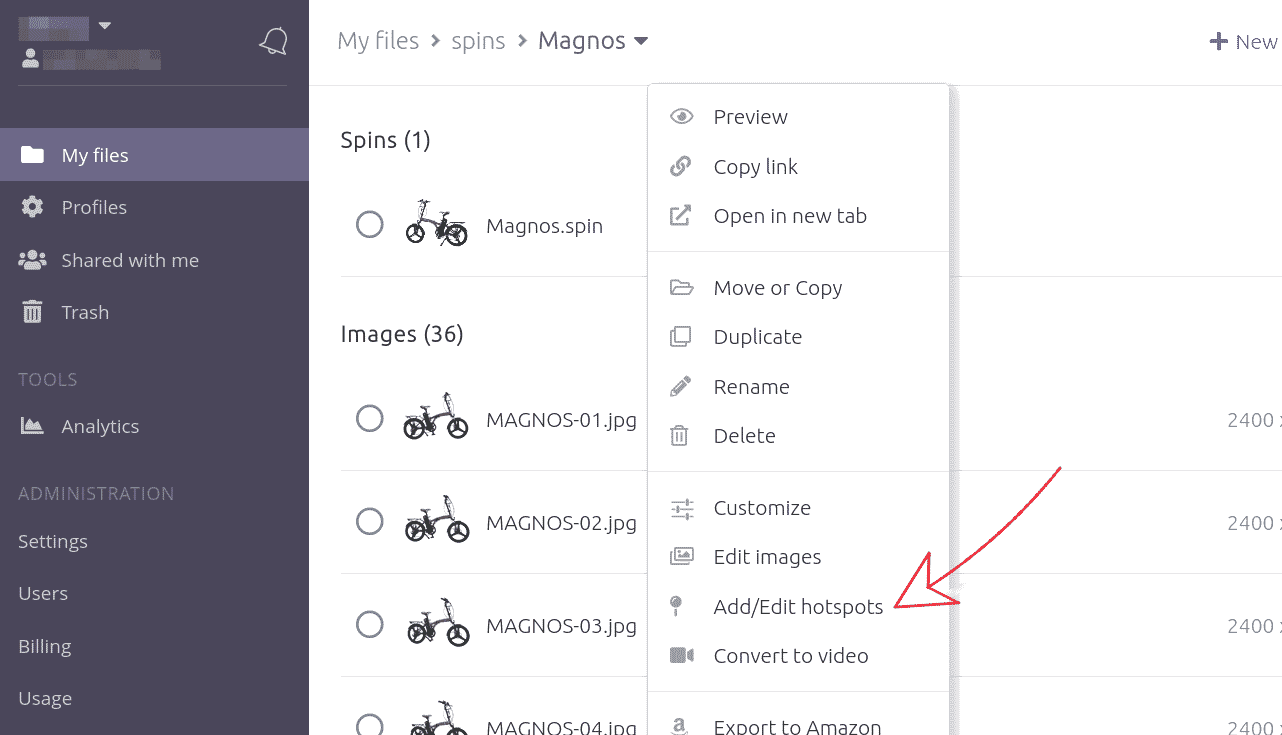
-
Click the spin to place the hotspot on the first frame where it must show, one frame in the middle and the last frame.
Sirv works out its position on the frames in between, so it turns with the product.
-
Add a tooltip, a message, or both. A tooltip shows when a visitor hovers over the hotspot, and a message shows when they click it.
-
Add any other hotspots. Turn the spin once to check each one stays on its part of the product, then click “Save”.
Your embed code stays the same. The hotspots are saved in the
.spinfile, so every page with the spin shows them. -
To change how hotspots look, add your own CSS. The hotspots article has the CSS for the hotspot, tooltip and message box.
What if the hotspots don’t show?
If there is no “Add/Edit hotspots” option, the editor isn’t on in your account yet. Ask support to turn it on.
If the hotspots show in Sirv but not on your site, your browser probably has an old copy of the spin. Clear the browser cache and reload.
If they still don’t show, send the link to your spin to Sirv support and they’ll check it.
Still stuck?
Our support team replies within 24 hours. For plans and pricing, talk to sales.
Was this answer helpful?