



Short answer
Sirv sells fixed monthly plans from $19, with a free plan and no overage fees, and has a built-in viewer for 360 spin, zoom, video and 3D. Cloudinary bills in credits that storage, bandwidth and every new image size draw from, starting at $99 a month (Cloudinary pricing page, checked 11 Nov 2026).
After reading this you will know
- What each service charges, with plan numbers checked on 11 Nov 2026
- How Cloudinary credits turn into a monthly bill for a real catalog
- How the same image URL is written on each service
- Which product media (360 spin, zoom, video, 3D) each one covers
- Which one fits your store
What is the difference between Sirv and Cloudinary?
Sirv is built for ecommerce product media on fixed monthly plans, and Cloudinary covers a wide range of media work priced in credits.
Both are image CDNs that resize, compress and convert images when a visitor asks for them.
Both handle video, have a media library, give developers an API, and offer Enterprise plans for large teams.
Sirv adds 360 spin, zoom and ready-made store plugins, and its Enterprise customers can deliver through their own CDN, such as Akamai.
This comparison is written by the Sirv team.
Every price and limit comes from each company’s own website, last checked on 11 Nov 2026. Sirv is an image CDN for ecommerce with on-the-fly image optimization, 360 spin, zoom, video and 3D.
More than 50,000 customers use it, and it serves files from 24 CDN locations. It has a free plan, and paid plans start at $19 a month with no overage fees.
Files go out over HTTP/2 and TLS 1.3, and Sirv reports 680 million images served a day and an average image transformation time of 0.15 seconds.
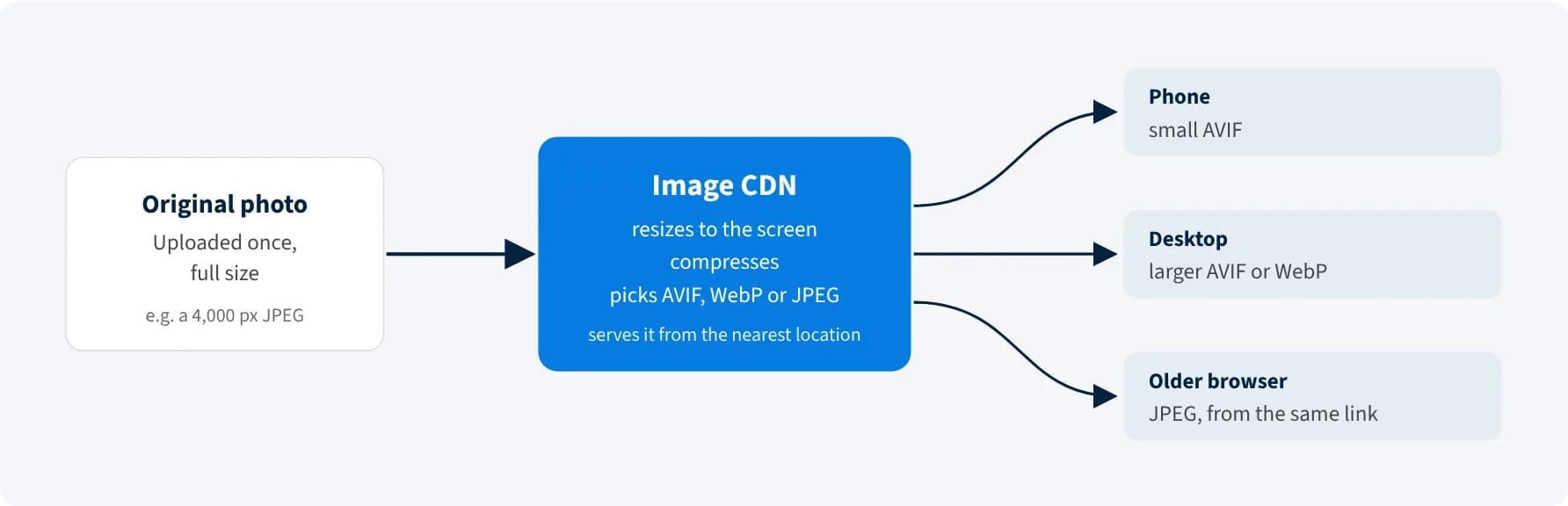
One original, the right file for each visitor.
With either service you upload one original photo, and the CDN makes each size and format on the first request. A theme change means a new number in the URL, with no re-export.
How much do Sirv and Cloudinary cost?
Sirv’s paid plans start at $19 a month for 5 GB storage and 20 GB transfer.
Cloudinary’s first paid plan, Plus, costs $99 a month ($89 billed yearly) for 225 credits (Cloudinary pricing page, checked 11 Nov 2026).
| Sirv | Cloudinary | |
|---|---|---|
| Free plan | $0, no card. 0.5 GB storage, 2 GB transfer a month, 3 users | $0, no card. 25 credits a month, 3 users |
| First paid plan | Business: $19 a month, or $209 a year. 5 GB storage, 20 GB transfer a month, 20 users | Plus: $99 a month, or $89 a month billed yearly. 225 credits a month, 3 users |
| Next plan up | $39 a month. 12 GB storage, 48 GB transfer | Advanced: $249 a month, or $224 billed yearly. 600 credits, 5 users |
| How usage is measured | Storage and monthly transfer, on fixed plans | Credits shared across services |
| Going over the plan | No overage fees. 50% extra transfer at no cost; above that for 2 months in a row, you upgrade within 14 days | Soft limits. You’re asked to upgrade or cut your usage |
Checked 11 Nov 2026 on sirv.com/pricing, Sirv allowances, cloudinary.com/pricing and Cloudinary’s usage limits help.
The bigger difference is how usage is counted. Sirv sells fixed amounts of storage and monthly transfer.
Cloudinary sells credits, and you spend them on storage, bandwidth and image processing from one pool.
How do Cloudinary credits work?
One Cloudinary credit equals 1 GB of storage, 1 GB of image bandwidth or 1,000 transformations, and all three come out of the same monthly pool (Cloudinary pricing page, checked 11 Nov 2026).
A transformation is each new version of an image, such as a new size. Repeat requests for a version Cloudinary has already made don’t count again.
Take a store with 2,000 products and 5 photos each. That’s 10,000 originals at about 2 MB each, shown in 4 sizes, with 150 GB of image traffic a month.
| Usage | Amount | Cloudinary credits |
|---|---|---|
| Storage | 10,000 photos × 2 MB = 20 GB | 20 |
| New sizes | 10,000 photos × 4 sizes = 40,000 transformations | 40 |
| Image bandwidth | 150 GB a month | 150 |
| Total | 210 of the 225 on Plus ($99) |
Example store with round numbers. Cloudinary credit values from cloudinary.com/pricing, checked 11 Nov 2026, and Cloudinary transformation counts, checked 27 Oct 2026. AVIF images of 2 megapixels or more count extra.
The same store fits Sirv’s Business plan with 40 GB storage and 160 GB transfer, at $89 a month ($979 a year), close to Cloudinary’s $99. A redesign is where they differ.
A new theme with 4 new sizes adds another 40,000 transformations, which takes this store past 225 credits that month.
Sirv doesn’t charge per transformation, and image processing is unlimited on every plan, so new sizes don’t change the price.
What happens if you go over your plan?
On both services your images keep serving when you go over, and you’re asked to upgrade if you stay over. Sirv charges no overage fees, and every plan includes 50% extra transfer at no cost.
If you use more than that for 2 months in a row, you have 14 days to move to a bigger plan before the account is paused.
Cloudinary treats its plan limits as soft limits and asks you to move to a bigger plan or reduce your usage. On both services, an account that stays over after the reminders can be paused.
How do image URLs work on each service?
Both take resize and format instructions in the URL. Cloudinary puts them in the path, separated by commas, and Sirv puts them after a question mark, like any web query string.
# Cloudinary: 600 px wide, best format, automatic qualityhttps://res.cloudinary.com/demo/image/upload/w_600,f_auto,q_auto/sample.jpg
# Sirv: 600 px wide, AVIF or WebP picked by defaulthttps://demo.sirv.com/look.jpg?w=600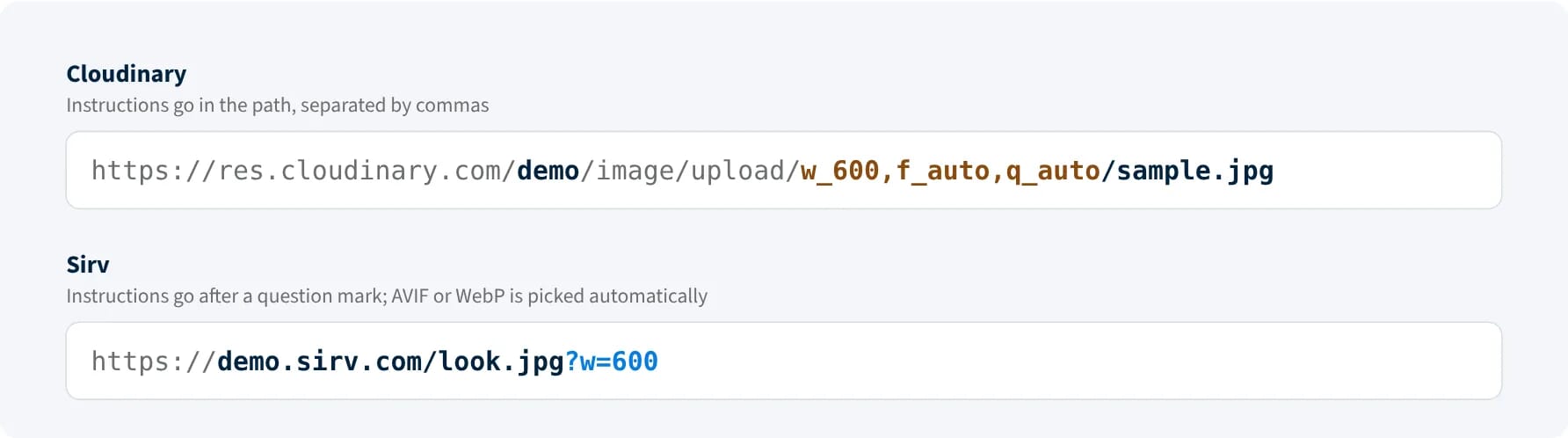
The same request on each service.
The settings store templates use most map directly.
| What you want | Cloudinary | Sirv |
|---|---|---|
| 600 px wide | w_600 | ?w=600 |
| 400 px high | h_400 | ?h=400 |
| Fit inside 600 × 400 | w_600,h_400,c_fit | ?w=600&h=400 (fit is the default) |
| Fill 600 × 400 and crop the rest | w_600,h_400,c_fill | ?w=600&h=400&scale.option=fill&cw=600&ch=400 |
| Quality 80 | q_80 | ?q=80 (80 is the default) |
| Best format for the browser | f_auto | Nothing to add, it’s the default |
| Force WebP | f_webp | ?format=webp |
Sirv settings tested on demo.sirv.com/look.jpg on 27 Oct 2026. Fill and crop returned 600 × 399, a 1 px rounding difference on this photo. Cloudinary settings from its transformation reference.
On Sirv you don’t add anything for format, because format=optimal is the default.
In our test on 26 Oct 2026, the same Sirv URL for demo.sirv.com/look.jpg returned 61 KB as AVIF, 89 KB as WebP and 99 KB as JPEG.

Which one is better for 360 spin, zoom and product video?
Sirv is the stronger choice when 360 spins are a big part of your product pages, because it makes and hosts each spin as a file and has 7 zoom modes.
Cloudinary’s Product Gallery also shows spins, zoom, video and 3D models, built from images you group with a tag.
On Sirv, a spin is one .spin file in a folder. You can make it from 8 to 1,000 photos, from a video, or from a 3D model. You embed it with two lines of HTML:
<script src="https://scripts.sirv.com/sirvjs/v3/sirv.js" async></script><div class="Sirv" data-src="https://demo.sirv.com/tshirt-aqua.spin"></div>Cloudinary’s Product Gallery widget fetches every image with a given tag and combines them into one spin set, ordered by their public IDs.
| Sirv | Cloudinary | |
|---|---|---|
| 360 spin | A .spin file made from 8 to 1,000 photos, a video or a 3D model. Hotspots on paid plans | A spin set made from images that share a tag, shown in the Product Gallery |
| Zoom | 7 zoom modes, including deep zoom for gigapixel images | Zoom in the Product Gallery, such as flyout zoom |
| Video | HLS streaming at several resolutions, on by default on paid plans and the free trial | Transcoding and adaptive streaming, on the Free plan too |
| 3D models | GLB and glTF viewer with AR on mobile, on paid plans | 3D models in the Product Gallery |
| Gallery | Sirv Media Viewer: images, zoom, spins, video and 3D, with 30+ options | Product Gallery widget |
Sirv: 360 product viewer, image zoom and pricing. Cloudinary: Product Gallery docs, Product Gallery announcement (updated May 29, 2024) and pricing. All checked 27 Oct 2026.
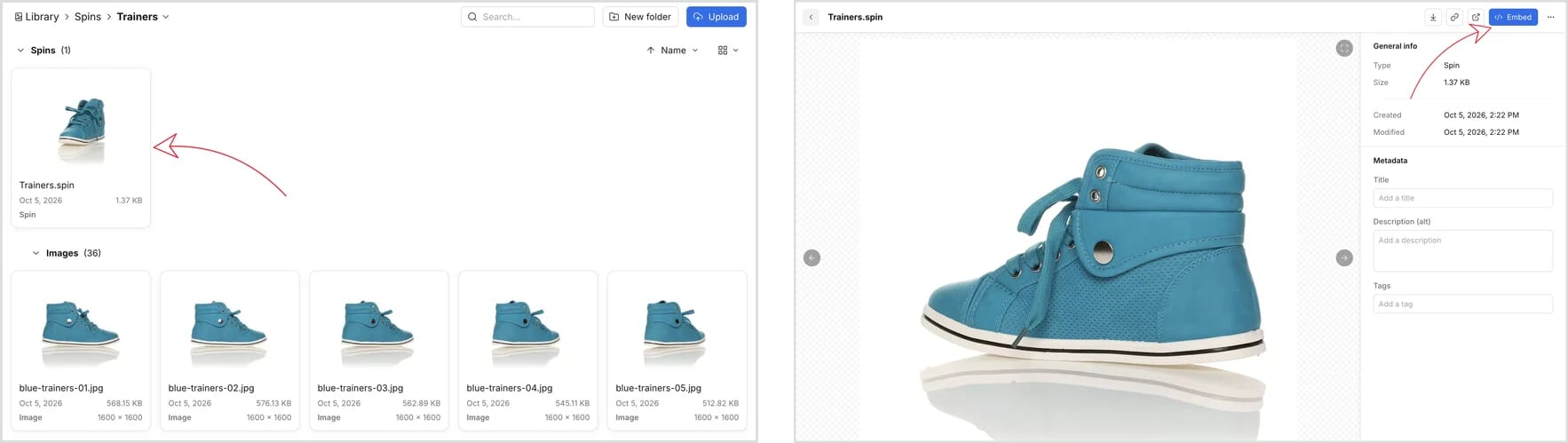
A Sirv spin folder with one .spin file and its 36 photos, and the spin’s preview with its Embed button.
Shooting your own spins? Our article on how to make a 360 product photo covers the kit, the camera settings and how many photos to take.
Which is easier for a store team to manage?
Sirv is easier for a larger store team, because its Business plans include 20 users and Cloudinary’s Plus plan includes 3 (Cloudinary pricing page, checked 11 Nov 2026).
Both have a web media library with a point-and-click image editor, so staff can crop and adjust photos without writing URLs.
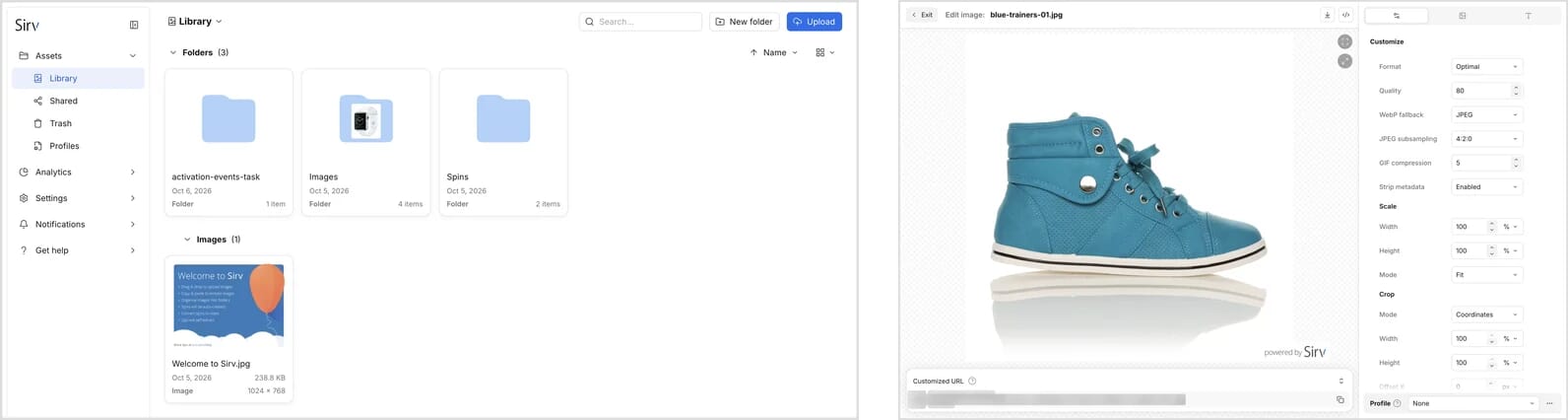
Sirv’s file manager and image editor.
Cloudinary’s Studio adds AI edits such as background removal and generative fill inside the library.
Cloudinary Studio from Cloudinary’s editing docs, last updated 22 Oct 2026, checked 27 Oct 2026. Screenshots taken in a Sirv test account on 27 Oct 2026.
So for most stores the choice here comes down to seats: count how many people will upload and edit product images, and compare that with each plan.
What do developers need to know before switching?
Sirv gives developers higher API limits and accepts larger images than Cloudinary’s Plus plan.
It has a REST API at api.sirv.com and an S3-compatible API at s3.sirv.com, so S3 tools and SDKs you already use can upload files.
Your account name is the bucket, requests use path-style URLs, and the keys are in your account settings. Upload by REST API (300 MB a file), S3 (512 MB), FTP (no size limit) or the web app.
| Sirv Business | Cloudinary Plus | |
|---|---|---|
| Management API requests an hour | 7,000 (REST API) | 2,000 (Admin API) |
| Largest image file | 128 MB | 20 MB |
From Sirv’s full list of limits and Cloudinary’s compare plans page, checked 11 Nov 2026.
For private files, Sirv supports JWT-signed URLs on Business 100 and above, domain restriction against hotlinking, and a custom domain with free SSL on paid plans.
Which should you choose for your store?
Choose Sirv if product pages with spins, zoom and video are the main job, and you want a fixed monthly bill.
Sirv has plugins for WordPress, WooCommerce, Magento, PrestaShop and other platforms, step-by-step guides for Shopify, and a REST API and S3 API for custom work.
Choose Cloudinary if your team already runs a large media pipeline on credits and uses its built-in AI editing every day.
| If you need | Better fit | Why |
|---|---|---|
| A product image CDN on a small budget | Sirv | Paid plans from $19 a month, against $99 |
| 360 spins across a large catalog | Sirv | Spins made from photos, video or 3D models, stored as files |
| Many people editing images | Sirv | 20 users on Business, against 3 on Plus |
| A bill that doesn’t move when you add image sizes | Sirv | Price set by storage and transfer, with no charge per transformation |
| One credit pool for images, video and AI editing | Cloudinary | Credits cover images, video and processing in one account |
| AI edits inside the media library | Cloudinary | Studio includes background removal and generative fill |
| Templates and code already built on Cloudinary URLs | Cloudinary | Moving means rewriting every image URL |
Sirv’s Cloudinary alternative page has the full feature-by-feature table, including which platforms each service integrates with.
How do you move from Cloudinary to Sirv?
You copy your originals to Sirv, or let Sirv’s auto-fetch pull each one on its first request, then move the size instructions from the URL path into the query string.
Auto-fetch lowers the risk of a big switch.
You point Sirv at the HTTP folder or S3 bucket where your originals live now, and Sirv stores each original the first time it’s requested, so you can move templates one at a time.
On Business it fetches up to 1,000 files an hour, each up to 5 MB. Auto-fetch comes with paid plans and the free trial (Sirv auto-fetch).
Cloudinary is a trademark of its owner. Prices checked on 11 Nov 2026.
Sirv’s support team helps anyone switching to Sirv by email. Enterprise plans add an onboarding manager, video calls, a migration service and custom scripts where needed.
Was this article helpful?