Sirv REST API
Account management API
Sirv provides you with 2 APIs:
- Sirv REST API - for account management.
- S3 API - for file management.
This page explains how to use the Sirv REST API for account management.
API client
To use the Sirv REST API, create an API client from the Settings page of your Sirv account: 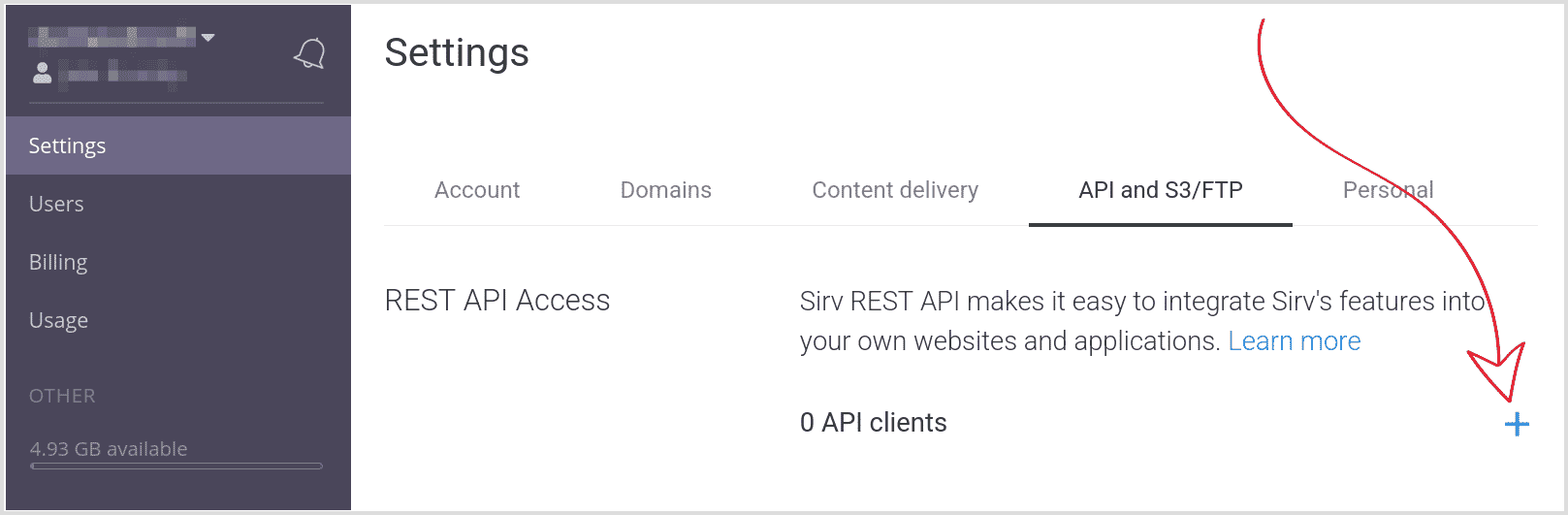 Once created, you'll see your Client ID and Client Secret:
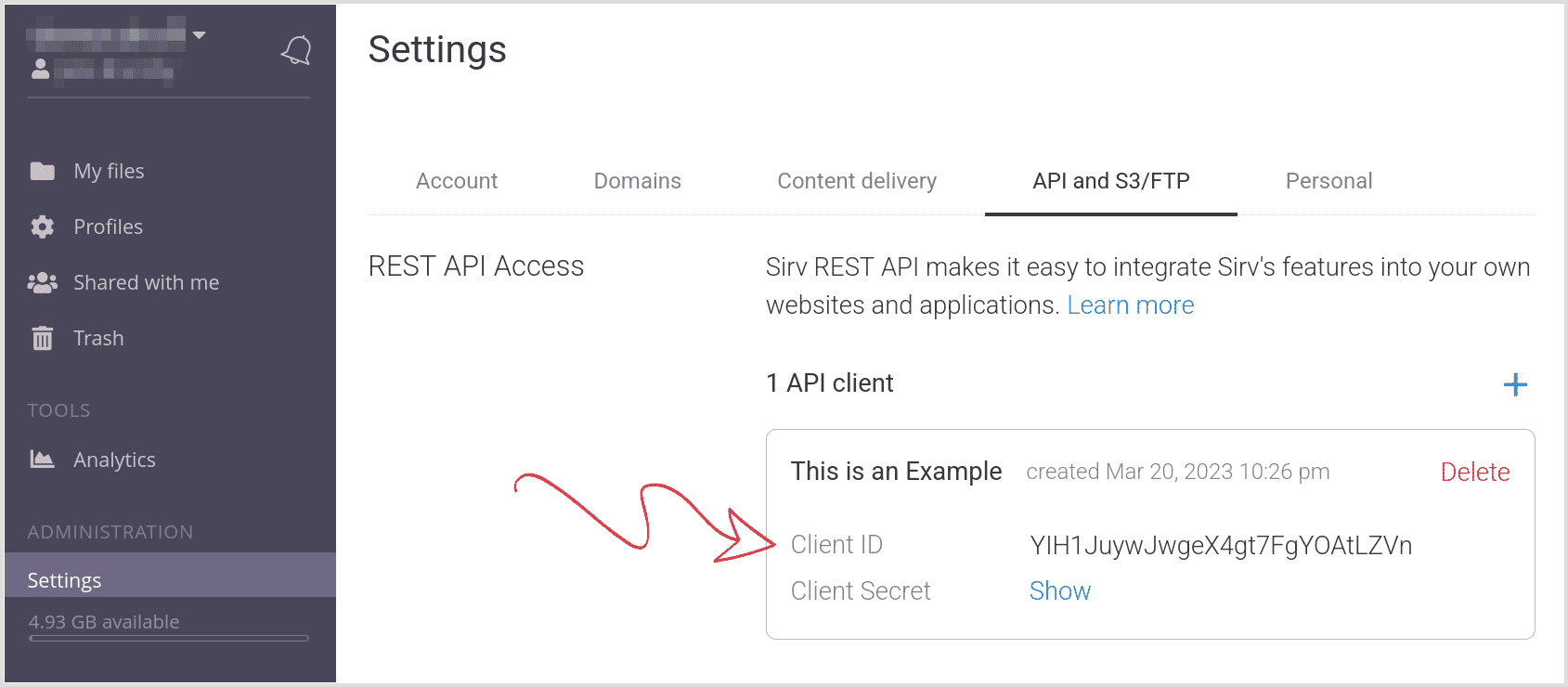 The clientId and clientSecret pair represent the API client. The API client can can have full access to all operations or be limited to specific API methods.
Connect to Sirv
Each API call must be authenticated with a bearer token (JSON Web Token). You can get a token with a POST request. Here's an example in curl:
curl --request POST \
  --url https://api.sirv.com/v2/token \
  --header 'content-type: application/json' \
  --data '{
 "clientId": "CLIENT_ID",
 "clientSecret": "CLIENT_SECRET"
}'
If you would like an example in another language, please send your requirements from your Sirv account contact form. The JSON response to the POST request will look like this:
{
"token": "eyJhbGciOiJIUzI1NiIsInR5cCI6IkpXVCJ9.eyJjbGllbnRJZCI6IkNMSVlYRjVqMERQV053cWpzdHJWbkNPVFRNbCIsImNsaWVudE5hbWUiOiJUZXN0IGNsaWVudCIsInNjb3BlIjpbImFjY291bnQ6cmVhZCIsImFjY291bnQ6d3JpdGUiLCJ1c2VyOnJlYWQiLCJ1c2VyOndyaXRlIiwiYmlsbGluZzpyZWFkIiwiYmlsbGluZzp3cml0ZSIsImZpbGVzOnJlYWQiLCJmaWxlczp3cml0ZSIsInZpZGVvcyIsImltYWdlcyJdLCJpYXQiOjE1MjIwODExMTYsImV4cCI6MTUyMjA4MjMxNiwiYXVkIjoiNDlnaGEyN2ZraHQzdGtyaml0aWJoNGJrazQxemdqdTgifQ.GkhToMKvy8hB68SNpqpPcxhsMczyyTtlROMvsqiPJ4Y",
"expiresIn": 1200,
"scope": [
"account:read",
"account:write",
"user:read",
"user:write",
"billing:read",
"billing:write",
"files:read",
"files:write",
"videos",
"images"
]
}
Use the token with the Sirv REST API methods listed below. When the token expires (see the expiresIn field, in seconds), you should request a new token.
API methods
Documentation for the Sirv REST API methods is available at https://apidocs.sirv.com/. It contains a summary of each method, how it can be used and a list of properties that can be set.
Each method is described below, some with example scripts.
Account info
Get information about the account:
- Endpoint: https://api.sirv.com/v2/account
- Documentation: https://api.sirv.com/v2/docs?path=/v2/account
Remote fetching
Configure remote HTTP/S3 file fetching or update fetching settings:
- Endpoint: https://api.sirv.com/v2/account/fetching
- Documentation: https://api.sirv.com/v2/docs?path=/v2/account/fetching
Learn more about Sirv's remote image fetching service.
API limits
The Sirv REST API has a limit to how many requests can be returned per hour. Check your current S3 REST API usage allowance, FTP limit and Sirv REST API limit:
- Endpoint: https://api.sirv.com/v2/account/limits
- Documentation: https://api.sirv.com/v2/docs?path=/v2/account/limits
This method will return:
- Your limit
- Number of requests in last hour
- Number of requests remaining
- Time when limit will reset (UTC epoch seconds)
Business plan limits
- Total requests per hour: 7000
- Search requests: 1000
- Video to spin conversions: 200
- Spin to video conversions: 200
- Fetch requests: 2000
- New account creations: 5
Enterprise plan limits
- Total requests per hour: 14000
- Search requests: 2000
- Video to spin conversions: 400
- Spin to video conversions: 400
- Fetch requests: 4000
- New account creations: 10
Free plan limits
- Total requests per hour: 500
- Search requests: 50
- Video to spin conversions: 20
- Spin to video conversions: 20
- Fetch requests: 300
- New account creations: 0
The total requests per hour is all types of request combined. Some specific requests, such as search or video to spin conversion have lower limits. The hour starts counting from the time that the first request is received by Sirv. For example, if a request is received at 18:35:51, the API allowance will be reset at 19:35:51.
Curl example
curl --request GET \
  --url https://api.sirv.com/v2/account/limits \
  --header 'authorization: Bearer RECEIVED_AUTH_TOKEN_HERE'
Example response:
{
  "s3:global": {
    "count": 27,
    "limit": 7000,
    "remaining": 6973,
    "reset": 1451575673
  },
  "s3:PUT": {
    "count": 0,
    "limit": 1500,
    "remaining": 1500,
    "reset": 1451577898
  },
  "s3:GET": {
    "count": 27,
    "limit": 2500,
    "remaining": 2473,
    "reset": 1451575673
  },
  "s3:DELETE": {
    "count": 0,
    "limit": 1000,
    "remaining": 1000,
    "reset": 1451577898
  }
}
Note: Accessing this endpoint will not count towards your REST API rate limit.
Account storage
Check how many files and how much storage (bytes) the account is currently using. It also states the maximum allowed storage, any extra storage that has been assigned, plus additional "burstable" storage allowance (for up to 30 days):
- Endpoint: https://api.sirv.com/v2/account/storage
- Documentation: https://api.sirv.com/v2/docs?path=/v2/account/storage
The JSON response will look like this:
{
	"plan": 100000000000,
	"burstable": 0,
	"extra": 0,
	"used": 14841537711,
	"files": 6152,
	"quotaExceededDate": null
}
List of account users
Get a list of all the account users:
- Endpoint: https://api.sirv.com/v2/account/users
- Documentation: https://api.sirv.com/v2/docs?path=/v2/account/users
Get billing plan
Get the name and details of the billing plan that the account uses:
- Endpoint: https://api.sirv.com/v2/billing/plan
- Documentation: https://api.sirv.com/v2/docs?path=/v2/billing/plan
Fetch/Download file
Download file from an HTTP/HTTPS URL and save it:
- Endpoint: https://api.sirv.com/v2/files/fetch
- Documentation: https://api.sirv.com/v2/docs?path=/v2/files/fetch
Meta tags
Create new meta tags, delete meta tags or get meta tags:
- Endpoint: https://api.sirv.com/v2/files/meta/tags
- Documentation: https://api.sirv.com/v2/docs?path=/v2/files/meta/tags
Meta description
Fetch or write the meta description of a file:
- Endpoint: https://api.sirv.com/v2/files/meta/description
- Documentation: https://api.sirv.com/v2/docs?path=/v2/files/meta/description
Meta title
Fetch or write the meta title of a file:
- Endpoint: https://api.sirv.com/v2/files/meta/title
- Documentation: https://api.sirv.com/v2/docs?path=/v2/files/meta/title
Meta product info
Fetch or write meta information about a product, for managing product image libraries:
- Endpoint: https://api.sirv.com/v2/files/meta/product
- Documentation: https://api.sirv.com/v2/docs?path=/v2/files/meta/product
The GET/POST commands can edit the following meta fields of any file or folder:
- meta.product.id
- meta.product.name
- meta.product.brand
- meta.product.category1
- meta.product.category2
Meta approval
Mark images as approved/rejected as part of a photography review process:
- Endpoint: https://api.sirv.com/v2/files/meta/approval
- Documentation: https://api.sirv.com/v2/docs?path=/v2/files/meta/approval
Folder options
Change the folder settings:
- Endpoint: https://api.sirv.com/v2/files/options
- Documentation: https://api.sirv.com/v2/docs?path=/v2/files/options
Folder options:
- Enable/disable scanning for 360 spins
- Name spins by folder name or file name
- Enable/disable public folder listing
- Lock/unlock folder (for Enterprise accounts)
Search
Search for files in an account:
- Endpoint: https://api.sirv.com/v2/files/search
- Documentation: https://api.sirv.com/v2/docs?path=/v2/files/search
The following fields can be searched:
- filename - Full filename and path
- dirname - Full parent directory path
- basename - File basename, without path
- extension - File extension with a dot (e.g. .jpg, .spin, .png)
The following example scripts will search an account and return a list of .spin files.
JavaScript search example
var data = JSON.stringify({
  "query": "basename:*.spin"
});

var xhr = new XMLHttpRequest();
xhr.withCredentials = true;

xhr.addEventListener("readystatechange", function () {
  if (this.readyState === this.DONE) {
    console.log(this.responseText);
  }
});

xhr.open("POST", "https://api.sirv.com/v2/files/search");
xhr.setRequestHeader("content-type", "application/json");
xhr.setRequestHeader("authorization", "Bearer RECEIVED_AUTH_TOKEN_HERE");

xhr.send(data);
Node.js search example
var http = require("https");

var options = {
  "method": "POST",
  "hostname": "api.sirv.com",
  "port": null,
  "path": "/v2/files/search",
  "headers": {
    "content-type": "application/json",
    "content-length": "30",
    "authorization": "Bearer RECEIVED_AUTH_TOKEN_HERE"
  }
};

var req = http.request(options, function (res) {
  var chunks = [];

  res.on("data", function (chunk) {
    chunks.push(chunk);
  });

  res.on("end", function () {
    var body = Buffer.concat(chunks);
    console.log(body.toString());
  });
});

req.write(JSON.stringify({ query: 'basename:*.spin' }));
req.end();
Curl search example (console)
curl --request POST \
  --url https://api.sirv.com/v2/files/search \
  --header 'authorization: Bearer RECEIVED_AUTH_TOKEN_HERE' \
  --header 'content-type: application/json' \
  --data '{
	"query": "basename:*.spin"
}'
Convert spin to video
Converts a spin into an MP4 video:
- Endpoint: https://api.sirv.com/v2/files/spin2video
- Documentation: https://api.sirv.com/v2/docs?path=/v2/files/spin2video
The following options are controllable:
- width - width of video in px.
- height - height of video in px.
- loops - number of times the video should loop (1, 2 or 3).
- row - number of rows to be included in the video.
If your spin has multiple rows, the "row" option can contain these values:
- single - includes one row of images in the video.
- all - includes all rows of images in the video (for 3D spins).
The following example scripts will convert a spin to a video:
Curl example
curl --request POST \
  --url https://api.sirv.com/v2/files/spin2video \
  --header 'authorization: Bearer eyJhbGciOiJIUzI1NiIsInR5cCI6IkpXVCJ9.eyJjbGllbnRJ' \
  --header 'content-type: application/json' \
  --data '{
	"filename": "/path/to/spin/Example.spin",
	"options": {
		"width": 200,
		"height": 200,
		"loops": 1,
		"row": "single"
	}
}
'
The JSON response will contain the converted video filename:
{
	"filename": "/path/to/spin/Example/Example_single_200x200.mp4"
}
Note how all parts of the file path and name are predictable - the spin is created in a folder of the same name as the video and the file is created using the video file name, number of rows, width and height (separated by underscores).
Convert video to spin
Convert a video into a spin - this method extracts images from the video and generates a spin file:
- Endpoint: https://api.sirv.com/v2/files/video2spin
- Documentation: https://api.sirv.com/v2/docs?path=/v2/files/video2spin
Make an API call and a response will be sent in JSON, containing the spin filename and path:
{
"filename": "/path/to/file.spin"
}
If there's an error, you'll see this:
{
"statusCode": 404,
"error": "Not Found",
"message": "No such file: /path/to/video.mp4"
}
JavaScript example
{
  Bucket: {your_account_alias}
  Key: 'sirv:api:videos/toSpin/' + JSON.stringify({ filename: '/path/to/video.mp4' })
}
Curl example
curl --request POST \
  --url https://api.sirv.com/v2/files/video2spin \
  --header 'authorization: Bearer eyJhbGciOiJIUzI1NiIsInR5cCI6IkpXVCJ9.eyJjbGllbnRJZCI6IkNMSVlYRjVqMERQV053cWpzdHJWbkNPVFRNbCIsImNsaWVudE5hbWUiOiJUZXN0IGNsaWVudCIsInNjb3BlIjpbImFjY291bnQ6cmVhZCIsImFjY291bnQ6d3JpdGUiLCJ1c2VyOnJlYWQiLCJ1c2VyOndyaXRlIiwiYmlsbGluZzpyZWFkIiwiYmlsbGluZzp3cml0ZSIsImZpbGVzOnJlYWQiLCJmaWxlczp3cml0ZSIsInZpZGVvcyIsImltYWdlcyJdLCJpYXQiOjE1MjIwODExMTYsImV4cCI6MTUyMjA4MjMxNiwiYXVkIjoiNDlnaGEyN2ZraHQzdGtyaml0aWJoNGJrazQxemdqdTgifQ.GkhToMKvy8hB68SNpqpPcxhsMczyyTtlROMvsqiPJ4Y' \
  --header 'content-type: application/json' \
  --data '{
	"filename": "/path/to/video/Example.mp4"
}'
The JSON response will contain the converted spin filename:
{
	"filename": "/path/to/video/Example/Example.spin"
}
or an error:
{
	"statusCode": 404,
	"error": "Not Found",
	"message": "No such file: /path/to/video/Example.mp4"
}
PHP example
$client = new http\Client;
$request = new http\Client\Request;

$body = new http\Message\Body;
$body->append('{
    "filename": "/path/to/video/Example.mp4"
}');

$request->setRequestUrl('https://api.sirv.com/v2/files/video2spin');
$request->setRequestMethod('POST');
$request->setBody($body);

$request->setHeaders(array(
  'authorization' => 'Bearer RECEIVED_TOKEN_HERE',
  'content-type' => 'application/json'
));

$client->enqueue($request)->send();
$response = $client->getResponse();
echo $response->getBody();
Get HTTP statistics
Get daily statistics for HTTP requests:
- Endpoint: https://api.sirv.com/v2/stats/http
- Documentation: https://api.sirv.com/v2/docs?path=/v2/stats/http
Storage stats
Check the daily storage usage stats:
- Endpoint: https://api.sirv.com/v2/stats/storage
- Documentation: https://api.sirv.com/v2/docs?path=/v2/stats/storage
The JSON response displays UNIX timestamps, e.g. 1525824000000 is 'Wed May 09 2018 00:00:00 GMT+0000 (UTC)'. Example:
{
	"1525824000000": {
		"plan": 100000000000,
		"burstable": 0,
		"extra": 0,
		"used": 14954599151,
		"files": 5830,
		"quotaExceededDate": null
	},

	"1525219200000": {
		"plan": 100000000000,
		"burstable": 0,
		"extra": 0,
		"used": 14954599151,
		"files": 5830,
		"quotaExceededDate": null
	}
}
By default it returns stats for last month. You can fetch another period by setting 'from/to' parameters, which can be UNIX timestamps or any parsable date/time representation in ISO 8601 or RFC 2822 Date time format.
Get API access token
Generate a temporary token, allowing API access for limited amount of time (seconds):
- Endpoint: https://api.sirv.com/v2/token
- Documentation: https://api.sirv.com/v2/docs?path=/v2/token
Get user information
Fetch information about a user, including name and role:
- Endpoint: https://api.sirv.com/v2/user
- Documentation: https://api.sirv.com/v2/docs?path=/v2/user
More API options
Sirv also provides special API methods, available upon request. Please contact Sirv support if you wish to have access to any of the following:
- Create new accounts
- Get user credentials
- Get list of user' accounts