Using Sirv CDN with Nuxt
Take advantage of the simplicity of Nuxt Image and power of Sirv with the official Nuxt/Image module. Your original Nuxt Image props will automatically translate to Sirv URL parameters.
Listed below are more than 100 options to scale, crop and apply watermarks, text and other effects. Try all the options in the dynamic imaging demo.
Live Nuxt demo
Play with the Nuxt Image live demo in your browser on StackBlitz or CodeSandbox.
Or you can check out a statically generated version here.
Getting started
-
Install the @nuxt/image module by following the instructions here.
-
Sign up for a Sirv account if you haven't already, and grab your account name from the settings page.
-
Add your base Sirv URL to your Nuxt config file:
// nuxt.config.ts
  image: {
    sirv: {
      baseURL: 'https://youralias.sirv.com/'
    }
} -
That's it! Now you can enjoy the convenience of Nuxt Image and powerful image optimization and delivery options of Sirv.
Usage
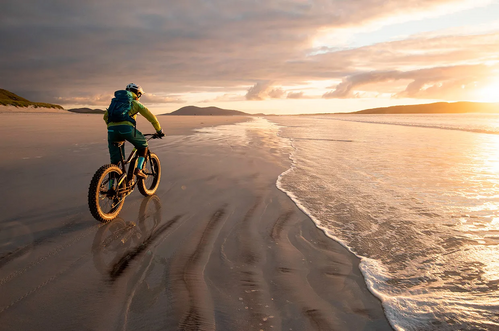
Sirv will automatically pick up standard Nuxt Image parameters like width, format, fit, quality and so on. E.g, this code:
Will render as:

To use Sirv specific parameters, you can use the modifiers prop, here's an example:
This will return this image:
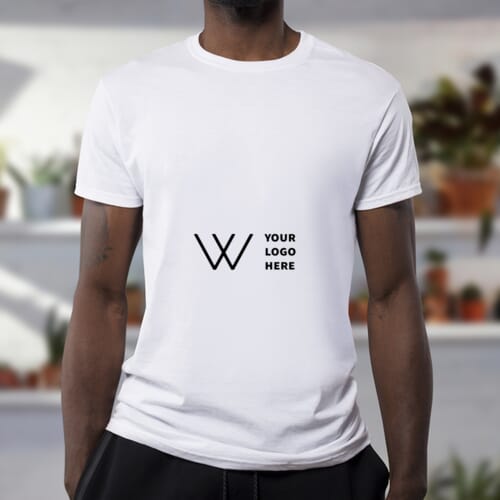
<img class="Sirv" data-src="https://demo.sirv.com/t-shirt-man.jpg?watermark=/watermark-v1.png&watermark.position=center&watermark.scale.width=30%&h=500" alt="Sirv watermark demo" />
Full list of options
Here's a full list of available modifiers:
[table]
| Parameter | Translates to | Description |
|---|---|---|
| width | w | Width of image |
| height | h | Height of image |
| s | s | Resize the image by its biggest side |
| quality | q | JPEG image quality (percentage) |
| fit | scale.option | Image scaling options |
| profile | profile | Apply a Sirv profile |
| format | format | Image format served (defaults to optimal) |
| webpFallback | webp-fallback | Image format for browsers without WebP support |
| subsampling | subsampling | Chroma subsampling to reduce JPEG file size |
| gifCompression | gif.lossy | Apply lossy compression, to reduce GIF file size |
| crop | crop.type | Automatically crop to edge of image contents; point of interest; or face |
| cropAr | crop.aspectratio | Aspect ratio of the crop |
| cw | cw | Crop the image to a specific width |
| ch | ch | Crop the image to a specific height |
| cx | cx | Position to start image crop (from top) |
| cy | cy | Position to start image crop (from left) |
| cropPaddingX | crop.pad.x | Add padding to left/right of crop area |
| cropPaddingY | crop.pad.y | Add padding to top/bottom of crop area |
| canvasHeight | canvas.height | Create a canvas around the image (height) |
| canvasWidth | canvas.width | Create a canvas around the image (width) |
| canvasAr | canvas.aspectratio | Aspect ratio of the canvas from 1-99 e.g. 16:9 |
| canvasPosition | canvas.position | Position of the canvas behind the image |
| canvasBorderWidth | canvas.border.width | Adds additional width left and right of the canvas |
| canvasBorderHeight | canvas.border.height | Adds additional height above and below the canvas |
| canvasBorderColor | canvas.border.color | Color of the canvas border e.g. E0AA80 or red |
| canvasBorderOpacity | canvas.border.opacity | Opacity of the canvas border |
| watermark | watermark | Filepath of the image to be overlayed |
| watermarkPosition | watermark.position | Position of the watermark on the image |
| watermarkPositionGravity | watermark.position.gravity | Starting point for shifting the x & y values |
| watermarkPositionX | watermark.position.x | Position of the watermark (from left) |
| watermarkPositionY | watermark.position.y | Position of the watermark (from top) |
| watermarkWidth | watermark.scale.width | Width of watermark |
| watermarkHeight | watermark.scale.height | Height of watermark |
| text | text | Display text on your image |
| textBase64 | text.text64 | Alternative to text parameter, with Base64 encoding |
| textSize | text.size | Width of text area in relation to image |
| textAlign | text.align | Align the multiline text |
| textPosition | text.position | Location of the text on the image |
| textPositionX | text.position.x | Location of the text (from left) |
| textPositionY | text.position.y | Location of the text (from top) |
| textPositionGravity | text.position.gravity | Master location of the text on the image |
| textFontSize | text.font.size | Fix the size of the text in px |
| textFontStyle | text.font.style | Style of the text |
| textFontFamily | text.font.family | Choose a font e.g. "Open Sans" |
| textFontWeight | text.font.weight | Choose font weight (light, normal, semi-bold, bold, extra-bold) |
| textColor | text.color | Text color e.g. E0AA80 or E0AA8020 |
| textOpacity | text.opacity | Text opacity |
| textOutlineWidth | text.outline.width | Add an outline around the text |
| textoutlineColor | text.outline.color | Color of the text outline |
| textOutlineOpacity | text.outline.opacity | Opacity of the text outline |
| textOutlineBlur | text.outline.blur | Blur the edge of the text outline |
| textBackgroundColor | text.background.color | Background color e.g. E0AA80 or E0AA8020 |
| textBackgroundOpacity | text.background.opacity | Background opacity |
| sharpen | sharpen | Sharpen the image |
| blur | blur | Blur the image |
| grayscale | grayscale | Make the image black & white |
| colorize | colorize | Overlay a color on the image |
| colorizeColor | colorize.color | The color of the colorize option |
| colorizeOpacity | colorize.opacity | Opacity of the color overlay |
| colortone | colortone | Change the color tone of the image |
| colortoneColor | colortone.color | Apply a color tone to an image |
| colortoneLevel | colortone.level | Set the level of blending with the original image |
| colortoneMode | colortone.mode | Apply the color tone to the entire image or shadows/highlights only |
| vignette | vigette.value | Adjust the depth of the vignette |
| vignetteColor | vigette.color | Add a vignette (dark edges) around the image |
| lightness | lightness | Change the lightness of the image |
| colorlevelBlack | colorlevel.black | Adjust black level of image |
| colorlevelWhite | colorlevel.white | Adjust white level of image |
| histogram | histogram | Display a histogram of RGB levels |
| hue | hue | Change the hue of the image |
| saturation | saturation | Change the saturation of the image |
| highlights | highlights | Change the highlights of the image |
| shadows | shadows | Change the shadows of the image |
| brightness | brightness | Change the brightness of the image |
| exposure | exposure | Change the exposure of the image |
| contrast | contrast | Change the contrast of the image |
| rotate | rotate | Number of degrees to rotate the image |
| flip | flip | Flip image vertically (mirror) |
| flop | flop | Flip image horizontally (mirror) |
| opacity | opacity | Opacity of PNG images |
| frameStyle | frame.style | Add a frame around the image |
| frameColor | frame.color | Frame color e.g. E0AA80 or E0AA8020 |
| frameWidth | frame.width | Frame width |
| frameRimColor | frame.rim.color | Frame rim color e.g. E0AA80 or E0AA8020 |
| frameRimWidth | frame.rim.width | Frame rim width |
| pdfPage | page | Page number of PDF when converted to image |
[/table]
Get expert help
If you need help using Sirv with Nuxt Image, please contact us. We love helping users and always reply within 24 hours.