Upload images to Sirv with GitHub actions
With Sirv's GitHub action you can automatically upload images from a folder in your GitHub repo to your Sirv account. It's a simple way to leverage Sirv's image CDN power: automatically convert images to next-gen formats, optimize and resize them, as well as apply more than 100 transformation options in your app.
Get Sirv API credentials
Create a Sirv API client. You can do this in your Sirv account settings.

After creating the API client, you'll be able to access your clientId and clientSecret keys.

Add environmental variables (secrets) to GitHub repo
After getting your clientId and clientSecret, add them as separate environmental variables by going to your repo's Settings -> Secrets -> Actions -> Add new secret.
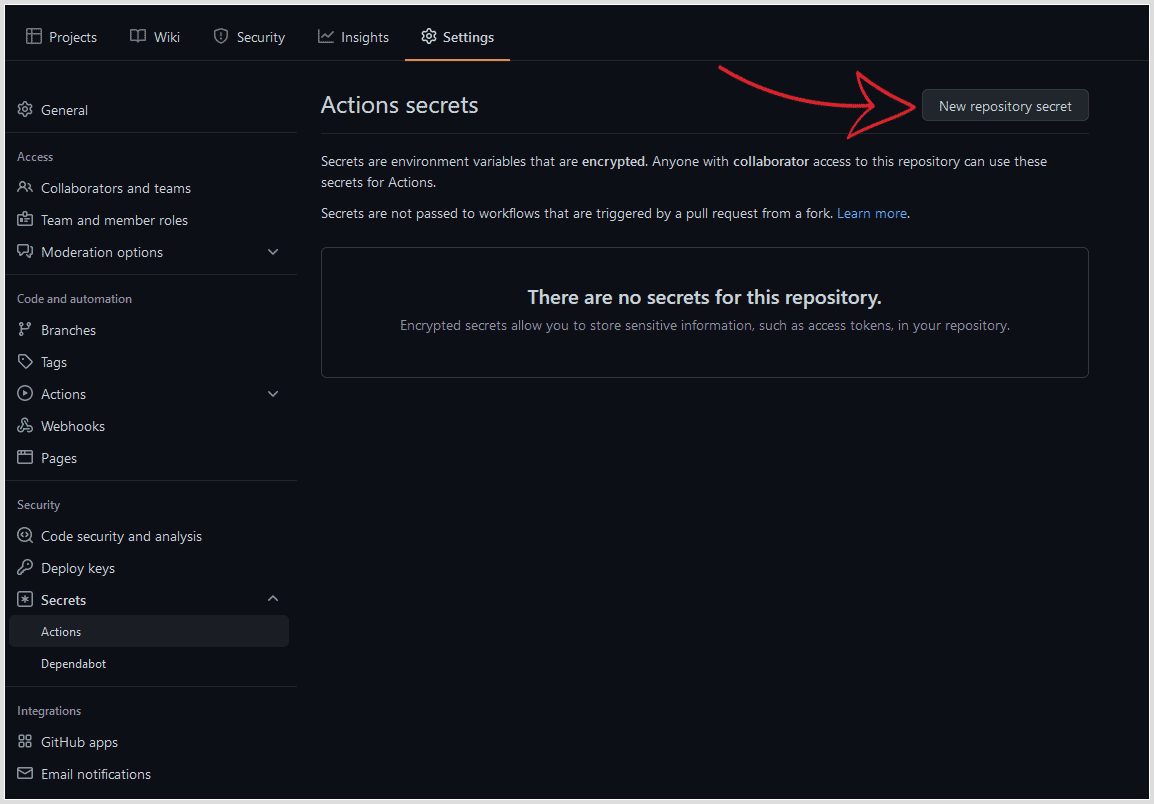
Create a GitHub workflow
Add a .github/workflows/sirv-upload.yml file to your GitHub repository.
Below is an example workflow code that will automatically upload all of your images in the /upload folder to your Sirv account after a push or a pull request.
name: Sirv uploader
on:
  push:
    branches: [ main ]
  pull_request:
    branches: [ main ]

  workflow_dispatch:

jobs:
  build:

    runs-on: ubuntu-latest
    environment: main
    steps:
      - uses: actions/checkout@v2
      - uses: sirv/gh-action-sirv@main
        name: Upload to Sirv
        id: Sirv
        with:
          clientId: ${{ secrets.clientId }}
          clientSecret: ${{ secrets.clientSecret}}
          source_dir: 'upload'
          output_dir: 'upload'
          purge: false
To change the source and output folders, simply edit the last two lines of code. By default, the action will use the same folder name as the source folder for the output folder.
Action inputs
The clientId & clientSecret must be passed as environmental variables. Source and output folders are adjusted in the workflow file. Set 'purge' to true, if you'd like the action to delete files from Sirv if they're no longer present in the repo.
[table]
| Name | Description |
|---|---|
| clientId | (Required) Your Sirv client ID key. Get it here. |
| clientSecret | (Required) Your Sirv client secret. Get it here. |
| source_dir | (Required) The local directory (or file) you wish to upload to Sirv. |
| output_dir | (Optional) The destination directory in Sirv. |
| purge | (Optional) Sync your repo images with Sirv. Setting this to true will delete files from Sirv which aren't present in your repo. |
[/table] [smv]